

The Top Enterprise Hosts by Volume view in the Performance Center Console shows the enterprise hosts that have the highest traffic volume, as reported by CA Network Flow Analysis. The example graphic shows the view in the CA Performance Center Console.
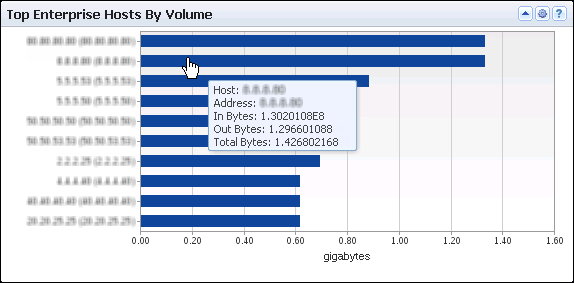
The view shows a bar for each of a maximum of 10 hosts that have the highest traffic volume. The bar chart includes the following information:
Identifies the host server by its name and IP address (Y-Axis). If an administrator has defined an alias for the device, the alias is displayed. Otherwise, the discovered device name is displayed.
Measures the total amount of data sent to or from the host, expressed in a scale that is appropriate for the highest-volume host (X-Axis).
Performance Center views show the data from the time range that is defined for the page.
Opening the View
To see this view in the Performance Center Console, go to one of the following locations:
Available Actions
You can perform several actions in this view, including the following ones:
Find the Comparable View in the NFA Console
The Top Enterprise Hosts by Volume view is similar to the Top Hosts view on the Enterprise Overview page in the NFA console.
|
Copyright © 2015 CA Technologies.
All rights reserved.
|
|