

You are a manager for a large managed service provider (MSP). You have Global Administrator access to CA Performance Center. You have registered data sources to monitor infrastructure usage, status, and performance at each customer site. In your role as CA Performance Center administrator, you can now create custom groups to organize infrastructure monitoring and reporting.
Custom CA Performance Center groups support the monitoring and management tasks of the IT organization. Custom groups let you organize managed items to facilitate troubleshooting and optimize reporting. Groups also let you assign data access permissions to IT staff. Using permission groups, you can make sure that the team monitoring selected devices or systems can see their performance data.
An MSP deployment represents some unique requirements. At the MSP level, you can create container groups that correspond to broad customer traits. You can use these groups to assign permissions to your IT staff and dedicate IT resources to address problems affecting individual MSP customers.
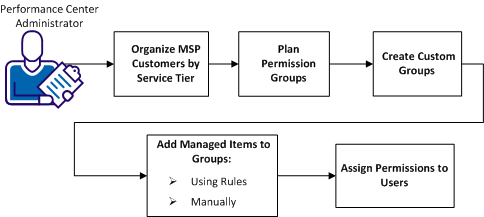
Group creation involves planning, creating, and populating groups, and then assigning groups as permissions to user accounts.
|
Tasks |
|---|
|
Copyright © 2015 CA Technologies.
All rights reserved.
|
|