

The multi-tenancy support in CA Performance Center lets you monitor discrete customer environments separately and securely. A tenant represents a customer environment that a managed service provider administers. Each tenant environment is independent and effectively functions as a separate instance of CA Performance Center. Each instance can contain multiple users and roles that are not shared among tenants.
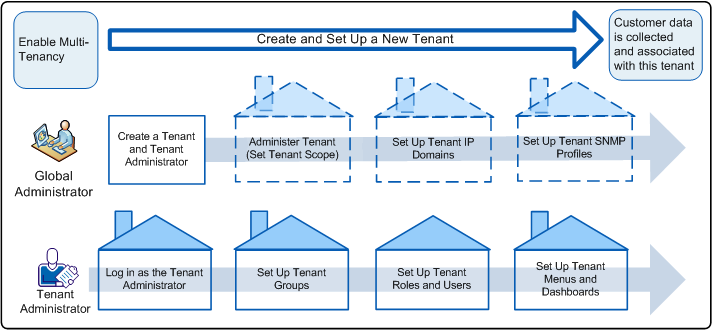
As the CA Performance Center administrator representing the managed service provider (MSP), your user account has global administrator permissions. Once you have created the basic tenant configuration, you can administer the tenant to complete the setup.
Or you can work with the MSP customers' IT staff to designate a tenant administrator for each customer. The operator designated as the tenant administrator can set up additional tenant SNMP profiles, custom groups, roles, users, and menus.
|
Tasks |
|---|
|
Copyright © 2015 CA Technologies.
All rights reserved.
|
|