

A group reference is a copy of another group. Its icon indicates that it is a copy:  You can delete group references by using the References tab for the original group. All groups that have been referenced somewhere in the Groups tree have an extra tab in the right pane. Use the "Remove References" tab to see and remove references to that group.
Deleting a group that has been referenced deletes all of its references. By contrast, if you delete a group reference, the original group is not affected.
Deleting a subgroup that is a reference does not affect the original group or the group that contains it. To delete a group that contains subgroup references, delete all of the references before deleting the group. Otherwise, issues arise when you attempt to remove the references.
For example, if several offices consolidate in a single location, delete all references to the closed offices to prevent them from appearing in search results. Deleting one reference does not delete them all.
Follow these steps:
The current groups appear in a tree structure.
In the right pane, a link to the original group that was copied appears.
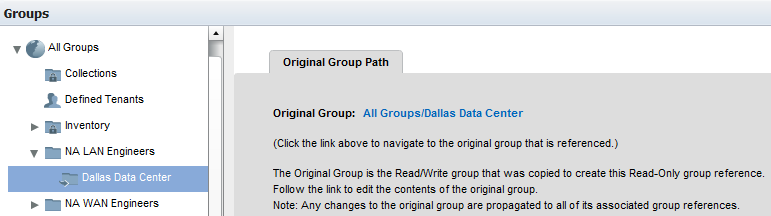
The original group appears, with a new tab in the right pane.
All references to this group are listed. The path of the references is included in the Groups tree.
A confirmation dialog appears.
The selected group reference is deleted.
|
Copyright © 2015 CA Technologies.
All rights reserved.
|
|