

Creating and Managing Tenants › About Tenants › Administrator Roles for Multi-Tenancy Support
Administrator Roles for Multi-Tenancy Support
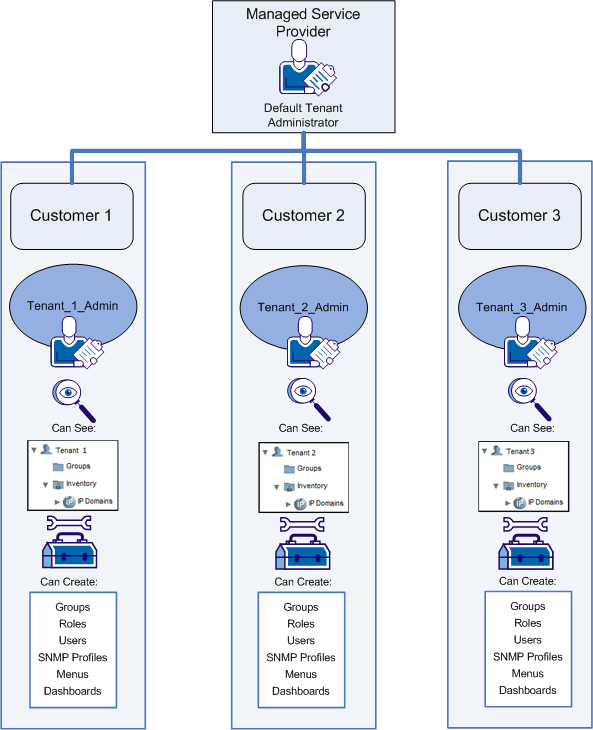
When multi-tenancy is deployed, two distinct administrator roles are supported:
- Global Administrator The global administrator administers product settings for all tenants. This user account, also called the "Default Tenant administrator" because of its association with the Default Tenant, creates tenants and performs tenant configuration. - The Default Tenant administrator, usually representing an MSP. Product settings and data are not shared among tenants, but the Default Tenant Administrator can access them and modify all settings. This user must have the predefined "Administrator" role.
- Tenant Administrator A tenant administrator has permissions to view all data from a single tenant. The tenant administrator can also add configuration, such as group definitions, profiles, and user accounts, to this tenant. This administrator role does not have permission to view items associated with any other tenant. - A limited administrator associated with a single tenant. This operator cannot access shared infrastructure or configuration belonging to the host (usually, the MSP). Tenant user accounts can include one or more of these administrator accounts.
When you create a tenant, the user interface prompts you to create a tenant administrator and a tenant user account. Operators who use these accounts can perform monitoring or administrative tasks within this tenant only. They cannot access the managed items and parameters associated with other tenants. Here is an illustration:
More information:
Add a Tenant
Predefined Roles
Administer a Tenant
Copyright © 2014 CA.
All rights reserved.
|
|