Reporting › CA Network Flow Analysis Views in CA Performance Center › Interface: Top Hosts › Top Hosts (Table)
Top Hosts (Table)
The Top Hosts (Table) views show rate, volume, or utilization for the highest volume hosts on a particular interface.
The example shows a Top Hosts (Table) view that is configured to show the rate for each listed host.
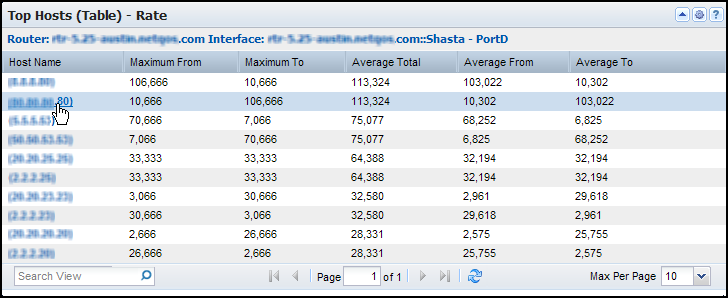
The view contains an interface identification string and a table. The table contains a row for each host with the host name or IP address and the following rate, volume, or utilization information (by default):
- Rate: Maximum rate of outbound data (Maximum From) and inbound data (Maximum To) for each host; average rates of total data (Average Total), outbound data (Average From), and inbound data (Average To) for each host.
- Volume: Number of bytes/megabytes of outbound data (From), inbound data (To), and all data (Total) for each host.
- Utilization: Maximum percentage of interface capacity that is utilized by the outbound data (Maximum From) and inbound data (Maximum To) for each host; and the average utilization by inbound data (Average From), outbound data (Average To), and total data (Average Total) for each host.
By default, views and reports show the most recent 24 hours of data.
To see a Top Hosts (Table) view in CA Performance Center, add it to a custom dashboard.
Available Actions for This View
You can perform several actions in this view, including the ones in the following list:
- Change the type of measurement, the view name, and the interface for the report by editing the view settings.
- Re-sort the table data by clicking a column heading. Click again to toggle between descending and ascending order.
- Change the Max Per Page value to show more or fewer items on each table page.
- Change the columns that are shown in the table: Click near a column border, click Columns, then choose the columns that you want to display.
- Click a host name to jump to a pre-filtered Interfaces report in CA Network Flow Analysis.
Find Host Tables in the NFA Console
You can display tables with host volumes in the NFA console for any interface that you have selected:
- Top N Hosts Summary -- Report type: Hosts. Filter: Top N Hosts. Presentation menu option: Summary Table; Volume.
View: Host Summary Table for the Top N Hosts.
- Hosts for a Single Protocol -- Report type: Protocols. Filter: Single protocol. Report subtype: Overview. Presentation menu option: Summary Table; Volume.
View: Protocol Host Summary Table for the single protocol.
- Hosts for a Single ToS -- Report type: ToS. Filter: Single ToS. Report subtype: Hosts. Subtype filter: Top N Hosts. Presentation menu options: Summary Table; Volume.
View: ToS Hosts Summary Table for the single ToS.
To display Flow Forensics-level detail, click the Flow Forensics link and run a Flow Forensics report.
|
Copyright © 2012 CA.
All rights reserved.
|
|

