

Initially, the CA MSM software catalog is empty. To see available products at your site, update the catalog tree. As new releases become available, update the catalog tree again to refresh the information. Any additions within a product are reflected within the Software Summary page. The available products are updated using the available site IDs associated with your credentials on the CA Support Online website.
Follow these steps:
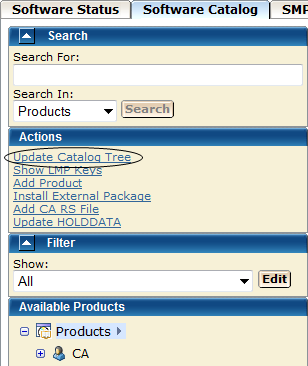
You are prompted to confirm the update.
Note: If you filter products in the product tree for specific site IDs, you can update the software catalog tree only for the selected filter. To do so, right-click the Products link at the top of the catalog tree on the left side, and select Update Catalog Tree.
A dialog that shows the progress of the task opens. When the task completes, you can click Show Results on the Progress tab to close this dialog. The task output browser opens and you can view the action details. Click Close to close the task output browser.
Note: While a task is in progress, you can perform other work. You can click Hide to exit the dialog and view the task status later on the Tasks tab.
All products for all site IDs are updated.
|
Copyright © 2011 CA.
All rights reserved.
|
|