

The Top Conversations (Bar) views show the conversations that have the highest traffic on the selected interface. A bar graph shows the volume for each conversation.
For example, use conversation information to determine the IP addresses of high-volume hosts. Contact the host owners or users to investigate the nature and purpose of the traffic.
You can view the conversations for incoming data, outgoing data, or all data as shown in the example view in the CA Performance Center Console.
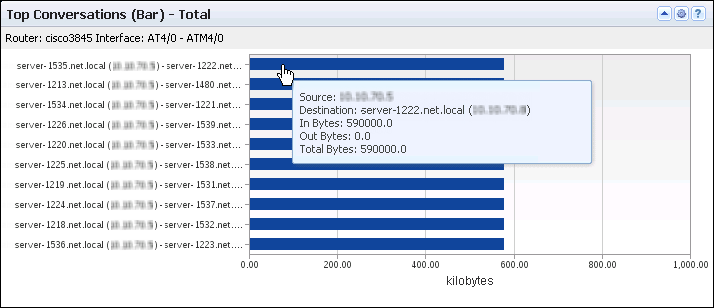
The view includes a bar for each top conversation on the selected interface. A maximum of 10 conversations are shown. The view includes the following information:
Identifies the interface that is used for the report. The identifier string consists of the router name, interface name, and interface description (under the view title).
(NPC) The identifier line also includes the interface speed.
Identifies the conversation source and destination servers by their names (the fully qualified DNS names, if they are available), followed by the IP addresses (Y-Axis).
Measures the total amount of data that was exchanged in the conversation expressed in a scale that is appropriate for the highest-volume conversation (X-Axis).
Performance Center views show the data from the time range that is defined for the page.
Opening the View
To see this view in the Performance Center Console, go to one of the following locations:
Available Actions
You can perform several actions in this view, including the following ones:
Find Conversation Data in the NFA Console
You can display conversation volume trend charts in the NFA console for any interface you have selected:
View: Conversations Multi Trend Summary (Total) for the Top N Conversations, plus other views.
View: Conversations Trend for the Top N Conversations.
View: Protocol Conversations Summary (Total) for a single protocol.
View: ToS Trend view for each conversation that uses the single ToS.
Note: To see trend charts for a single conversation, click Top N Conversations and select a single conversation as the filter.
To display Flow Forensics-level detail, click the Flow Forensics link and run a Flow Forensics report.
|
Copyright © 2014 CA.
All rights reserved.
|
|