

The typical CA Performance Center authentication process using Single Sign-On differs from authentication that takes advantage of SAML 2.0 support. With SAML 2.0 authentication, users do not see the CA Performance Center Login page. They are instead redirected to an interface that the IdP provides. For all other supported authentication methods, Single Sign-On provides the login page.
The following diagram illustrates the SAML 2.0 authentication process with Single Sign-On, CA Performance Center, and an IdP that supports the SAML 2.0 standard, such as CA SiteMinder:
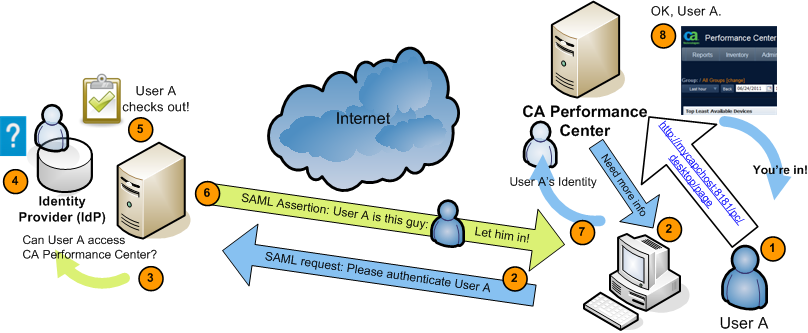
The following generic process describes how CA Performance Center supports SAML 2.0 authentication. Implementation-specific options, such as digitally signed certificates and transport binding, have been omitted:
For example, the IdP might interact with the browser to challenge the user to provide credentials. This stage of the authentication is irrelevant to CA Single Sign-On.
The assertion includes a required attribute, subjectNameId, and an optional attribute, ClonedUser.
The value of subjectNameId corresponds to the authorized user.
You can include the name of the cloned user account in the assertion. This attribute defines the user account to which authorized SAML users are mapped.
|
Copyright © 2013 CA.
All rights reserved.
|
|