

|
|
|
You can use a setting on the Application Settings page to change the naming convention for interfaces. The default setting adds the device name in front of the interface name. This setting affects the way interface names appear in some NFA console report views, but not in all report views.
The interface names that result can include unwanted duplications, depending on the way devices and interfaces are named. For example, suppose both the device name and the interface name are Device1, then by default the interface name is Device1::Device1, as illustrated in the following example:
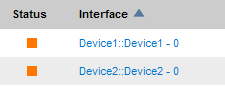
To eliminate the duplication, edit the Application Settings to hide the device name.
Follow these steps:
The Administration page opens.
The Application Settings page opens.
With the Show Device Name value set to False, device names in reports and views are not prepended to interface names.
| Copyright © 2012 CA. All rights reserved. | Tell Technical Publications how we can improve this information |