

|
|
|
Decoded SOAP packets help network analysts diagnose problems. By reviewing the decoded data, you can easily identify requests that have failed and gain understanding of the data flow that transpires during a web service exchange.
Decoding is limited to HTTP as the underlying protocol for transporting SOAP messages.
The following example shows an error condition:
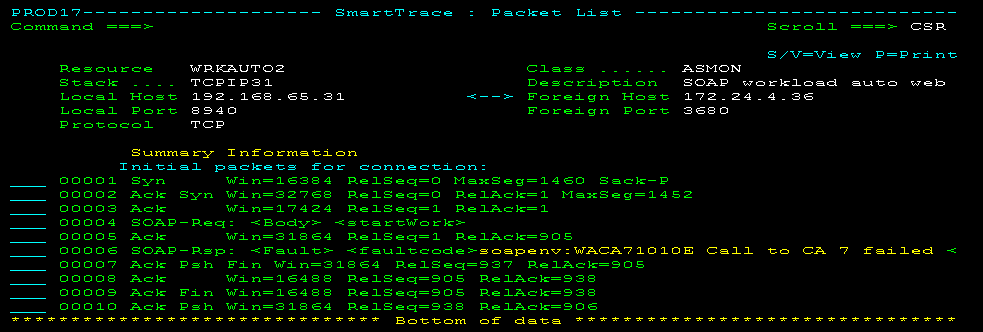
Typically, SOAP packets are segmented. You can view the reassembled packets using data flow reports.
During diagnosis, you may want to see the summary information about TCP instead of the decoded FTP, HTTP, and Telnet ports. For example, you may want to find out about the window sizes and sequence numbers across a number of packets. The TCPSUMM command lets you hide any decoded information temporarily on the Packet List panel.
To hide decoded information from the packet list, enter TCPSUMM at the Command prompt.
To redisplay the decoded information, press F6 (Refresh).
From Packet List, you can view the details of a packet. You can view the details in different formats.
To view the packet data
The details appear.
Note: To view the actual data in a packet, you must have authority.
The format of the displayed details changes.
The contents of the Formatted Packet Display vary according to the type of packet and its contents. There are three display formats for the Formatted Packet Display. You can move between the three display formats by pressing F6 (Format).
Format A
PROD------------------ TCP/IP : Formatted Packet Display -------Columns 001 079
Command ===>                                                   Scroll ===> PAGE
********************************* TOP OF DATA *********************************
PKT  Packet # ..... 00000002     Direction .........  Recv
     Date ......... 19-SEP-2006  Time ..............  10:16:58.408203
     Link Name .... OSATR0
IP   Source Addr ..... 10.16.91.126    Destination Addr ... 10.16.77.25
     IP Version ...... 4               Header Length ...... 5
     Type of Service . B'00000000'     Total Length ....... 40
     Identification .. 47203           Flags .............. B'010'
     Frag Offset ..... 0               Time To Live ....... 125
     Protocol ........ TCP             Header Chksum ...... X'0BD4'
TCP  Src Port ........ 2336            Dest Port ... TELNET
     Seq Number ...... X'F9F3F6F5'     Ack Number .. X'F6F8F3F4'
     Data Offset ..... 20              Flags ....... ACK
     Window .......... 8638            Checksum .... X'C06C'
     Urgent Pointer .. 0
Format B
PROD----------------- TCP/IP : Formatted Packet Display -------Columns 001 079
Command ===>                                                  Scroll ===> PAGE
********************************* TOP OF DATA ********************************
PKT  Packet # ..... 00000002     Direction .........  Recv
     Date ......... 19-SEP-2006  Time ..............  10:16:58.408203
     Link Name .... OSATR0
IP   Source Addr ..... 10.16.91.126    Destination Addr ... 10.16.77.25
     IP Version ...... 4               Header Length ...... 5
     Type of Service . B'00000000'     Total Length ....... 40
     Identification .. 47203           Flags .............. B'010'
     Frag Offset ..... 0               Time To Live ....... 125
     Protocol ........ TCP             Header Chksum ...... X'0BD4'
          +----------- IP Header -----------+ +--- EBCDIC ---+ +---  ASCII ---+
    +0000 45000028 B8634000 7D060BD4 C7005B7E         '  MG $= E  ( c@ }      ~
    +0010 C7005019                            G &                P
TCP  Src Port ........ 2336            Dest Port ... TELNET
     Seq Number ...... X'F9F3F6F5'     Ack Number .. X'F6F8F3F4'
     Data Offset ..... 20              Flags ....... ACK
Format C
********************************* TOP OF DATA *********************************
PKT  Packet # ..... 00000002     Direction .........  Recv
     Date ......... 19-SEP-2006  Time ..............  10:16:58.408203
     Link Name .... OSATR0

          +-------- IP Header Data ---------+ +--- EBCDIC ---+ +---  ASCII ---+
    +0000 45000028 B8634000 7D060BD4 C7005B7E         '  MG $= E  ( c@ }      ~
    +0010 C7005019                            G &                P

          +------------ IP Data ------------+ +--- EBCDIC ---+ +---  ASCII ---+
    +0000 09200017 28BCF407 37D33643 501021BE       4  L  &        (   7 6CP !
    +0010 C06C0000                            {%                l
****************************** BOTTOM OF DATA *********************************
Note: For more information about the information displayed, see the Request for Comments (RFC) for the protocol being used:
The Formatted Packet Display shows several groups of data. Some of these groups of data are displayed in only one format of the panel; others are displayed in two or three of the formats.
Each group of data relates to one of the following:
The following table identifies the groups of data displayed in the different formats:
|
Format |
Data Displayed |
|---|---|
|
A |
Packet details |
|
B |
Packet details |
|
C |
Packet details |
Packet details are displayed in all three formats of the Formatted Packet Display.
PKT  Packet # ........ 00000002        Direction .........  Send
     Date ............ 12-Mar-2006     Time ..............  15:32:09.456064
     Link Name ....... IUCVLNK
The IP header fields for the packet are displayed in Format A and Format B of the Formatted Packet Display.
     IP Version ...... 4               Header Length ...... 5
     Type of Service . B'00000000'     Total Length ....... 472
     Identification .. 22900           Flags .............. B'000'
     Frag Offset ..... 0               Time To Live ....... 60
     Protocol ........ UDP             Header Chksum ...... X'D555'
For some packets, there is a group of items displayed as IP options in Format A of the Formatted Packet Display.
     OPTION=COPY   CONTROL  LOOSE_SRC LEN=11 PTR=4
            1.2.3.4
            5.6.7.8
     OPTION=NOCOPY CONTROL  END_LIST
Note: For more information about IP options, see RFC 791.
Protocol header fields are displayed in Format A and Formt B of the Formatted Packet Display. The header displayed depends on the protocol: TCP, UDP, or ICMP.
TCP Header Fields on the Formatted Packet Display
TCP  Src Port ........ TELNET          Dest Port ... 3355
     Seq Number ...... X'F9F3F6F5'     Ack Number .. X'F6F8F3F4'
     Data Offset ..... 20              Flags ....... ACK PSH
     Window .......... 1853            Checksum .... X'6981'
     Urgent Pointer .. 0
UDP Header Fields on the Formatted Packet Display
UDP  Src Port ........ 53              Dest Port ... 1173
     Length .......... 94              Checksum .... X'BE47'
ICMP Header Fields on the Formatted Packet Display
ICMP Msg Type ............... Echo Request
     Code ................... 0
     Checksum ............... X'7A94'
     Identifier ............. 12
     Sequence Number ........ 0
For some packets, there is a group of items displayed as TCP options in Format A of the Formatted Packet Display.
 TCP Option               Value
 ----------               -----
 Maximum Segment Size     255
 No Operation
 End Of Options List
Protocol data appears in Format A and Format B of the Formatted Packet Display. Protocol header data appears in Format B only.
The details displayed depend on the protocol: TCP, UDP, or ICMP. The packet’s data is displayed in three columns in different representations: hexadecimal, EBCDIC, and ASCII.
TCP Data on the Formatted Packet Display
          +----------- TCP Data ------------+ +--- EBCDIC ---+ +---  ASCII ---+
    +0000 3C404000 13114040 2902C0E8 42F5E2E3           {Y 5ST <@@   @@)   B
    +0010 D5D4F13C 40616029 02C0E842 F5E2A385 AB1  /-  {Y 5Abc    <@a)   B
    +0020 8740E296 12A3A456 12345678 C0E842F5 g Software  {Y 5  @        )   B
    +0030 3CC15060 11C15029 02C0E842 F23CC260  A&- A&  {Y 2 B- < P P)   B <
    +0040 4011C260 2902C0F0 42F43CC2 E6402902   B-  {0 4 BW    @  )   B <  @)
    +0050 C0E842F7 4E3CC27D 604E3CC3 12345678 {Y 7+ B'-+ C-      B N< }< @)
    +0060 C0F042F4 D3E44040 12345678 C0E842F7 {0 4LU      {Y 7   B   @@@@)   B
    +0070 D5D5D5D5 D5F0F0F2 11C3F029 02C0F042 aaaaa002 C0  {0             )   B
    +0080 F43CC3F6 402902C0 E842F74F 3CC4C67E 4 C6   {Y 7| DF=  <  @)   B O<  ~
    +0090 3CC44D40 4F3CC4D6 402902C0 F042F1D6  D( | DO   {0 1O < M@O<  @)   B
    +00A0 2902C0E8 42F7D629 02C0E842 F2D62902   {Y 7O  {Y 2O   )   B  )   B  )
TCP Header Data on the Formatted Packet Display
          +-------- TCP Header Data --------+ +--- EBCDIC ---+ +---  ASCII ---+
    +0000 00170D1B 0DBC6D44 0DA807C4 5018073D       _  y D&          mD    P  =
    +0010 69810000                       a                 i
UDP Data on the Formatted Packet Display
          +----------- UDP Data ------------+ +--- EBCDIC ---+ +---  ASCII ---+
    +0000 00018580 00010001 00000000 02353302   e                           53
    +0010 12345678 12345678 07696E2D 61646472           > /    90 0 192 in-addr
    +0020 04617270 6100000C 0001C00C 000C0001  /  /     {       arpa
    +0030 0000D141 12345678 616E796D 65646502   J     />_        A   ganymede
    +0040 12345678 03313939 07696E2D 61646472           > /    90 0 192 in-addr
    +0050 04617270 6100                        /  /             arpa
UDP Header Data on the Formatted Packet Display
          +---------- UDP Header -----------+ +--- EBCDIC ---+ +---  ASCII ---+
    +0000 00350495 005EBE47                      n ;            5    G
ICMP Data on the Formatted Packet Display
          +----------- ICMP Data -----------+ +--- EBCDIC ---+ +---  ASCII ---+
    +0000 48B63B8B 1A1F56FF 10111213 14151617                  H ;   V
    +0010 18191A1B 1C1D1E1F 20212223 24252627                           !"#$%&'
    +0020 28292A2B 2C2D2E2F 30313233 34353637                  ()*+,-./01234567
    +0030 38393A3B 3C3D3E3F 40414243 44454647                  89:;<=>?@ABCDEFG
    +0040 48494A4B 4C4D4E4F 50515253 54555657   ¢.<(+|&        HIJKLMNOPQRSTUVW
    +0050 58595A5B 5C5D5E5F 60616263 64656667   !$*);-/       XYZ  _
    +0060 68696A6B 6C6D6E6F 70717273 74757677   <x:ad>,%_>?   hijklmnopqrstuvw
    +0070 78797A7B 7C7D7E7F 80818283 84858687  :#@'=" abcdefg xyz{<x:ad>}~
    +0080 88898A8B 8C8D8E8F 90919293 94959697 hi       jklmnop
    +0090 98999A9B 9C9D9E9F A0A1A2A3 A4A5A6A7 qr       ~stuvwx
    +00A0 A8A9AAAB ACADAEAF B0B1B2B3 B4B5B6B7 yz
ICMP Header Data on the Formatted Packet Display
          +---------- ICMP Header ----------+ +--- EBCDIC ---+ +---  ASCII ---+
    +0000 08007A94 000C0000                     :m               z
IP Data on the Formatted Packet Display
          +------------ IP Data ------------+ +--- EBCDIC ---+ +---  ASCII ---+
    +0000 00170D1B 0DBC6D44 0DA807C4 5018073D       _  y D&          mD    P  =
    +0010 12345678 01C21140 40290142 F4114040  a   B      4    i      @@) B  @@
    +0020 3C404000 12345678 2902C0E8 42F5E2E3           {Y 5ST <@@   @@)   B
    +0030 D5D4F13C 12345678 02C0E842 F5E2A385 XX1  /-  {Y 5Abc    <@a)   B
    +0040 12345678 8740E296 86A3A681 12345678 defgh Software        @        )
    +0050 C0E842F5 3CC15060 11C15029 02C0E842 {Y 5 A&- A&  {Y    B < P P)   B
    +0060 F23CC260 4011C260 2902C0F0 42F43CC2 2 B-  B-  {0 4 B  < @  )   B <
    +0070 E6402902 C0E842F7 4E3CC27D 604E3CC3 W   {Y 7+ B'-+ C  @)   B N< }<
    +0080 60402902 C0F042F4 D3E44040 40402902 -   {0 4LU       @)   B   @@@@)
    +0090 C1E234F5 D5D5D5D5 D5F0F0F2 11C3F029 {Y 7aaaaa002 C0    B            )
    +00A0 02C0F042 F43CC3F6 402902C0 E842F74F  {0 4 C6   {Y 7|    B <  @)   B O
IP Header Data on the Formatted Packet Display
          +----------- IP Header -----------+ +--- EBCDIC ---+ +---  ASCII ---+
    +0000 450004D8 721C0000 3C06A9AB C7005019    Q      z G &  E   r   <     P
    +0010 C700803E                            G                   >
Both the Packet List panel and the Formatted Packet Display panel let you print the data in a packet..
To print packet data from Packet List
The Confirm Printer panel appears.
The packet details are printed.
To print packet data from Formatted Packet Display
The Confirm Printer panel appears.
The packet details are printed.
| Copyright © 2012 CA. All rights reserved. |
|