

|
|
|
To access SmartTrace functions, use the ST (DB2 DDF SmartTrace) option to open the Address Space SmartTrace Menu. From the menu, you can select the DDF address space you want to trace. Only address spaces defined as ASMON resources of Type DB2 are available.
IBM’s DB2 distributed database functionality is based on DRDA. Decoded DRDA packets help application programmers and network analysts who have limited knowledge of DB2 to diagnose problems.
The SMARTTRACE parameter group specifies the ports to decode. You can also use the DECODE command to specify ports on demand.
On the 3270 interface, you can use the following primary commands to change the contents in the Summary Information column:
(Default view) Displays the SQL commands and responses in a DRDA packet. If there is no SQL information, the Distributed Data Management (DDM) commands and responses are shown.
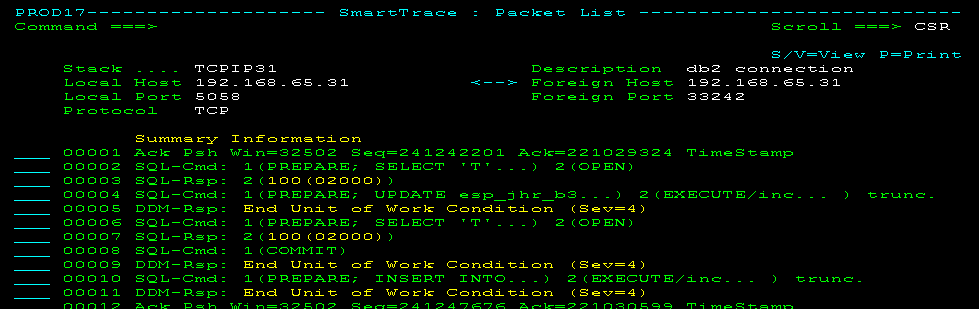
This view is useful for troubleshooting SQL application issues. When a response shows an SQL status code, you can display an explanation of the code using the SQL line command.
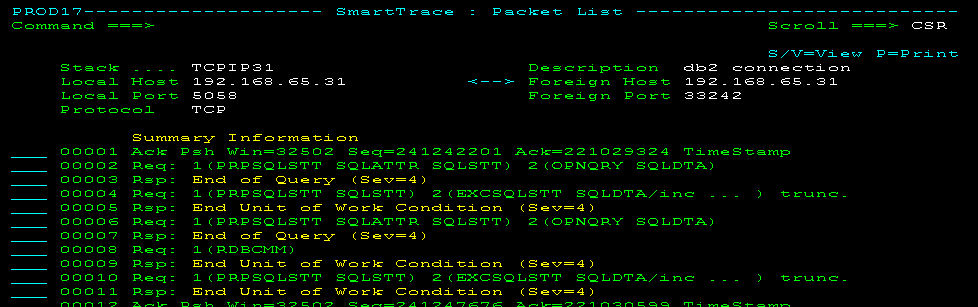
Displays only the DDM commands and responses in a DRDA packet. This view requires knowledge of the DRDA command set. The following panel shows the previous example in DDM view:
| Copyright © 2012 CA. All rights reserved. |
|