

|
|
|
The connection lists tell you about the connections. The lists do not alert you automatically to specific conditions that you want to know about (for example, termination of a critical connection). To be warned of these specific conditions, you can define event detectors.
An event detector defines the network and systems events that you want to monitor, and what to do when the event occurs.
You can define an alert to raise, and you can define the wording of the alert. You can also define an automatic action to run.
Sample event detector definitions are supplied. Each type of event is represented in the samples. Use these definitions as examples when you create your own event detectors.
You can define detectors from the Event Detector Controls List. You can enter the /EDETECT shortcut to access the list.
Example: Event Detector That Alerts on a Terminated Connection
This example shows an event detector that generates an alert when a critical connection is terminated.
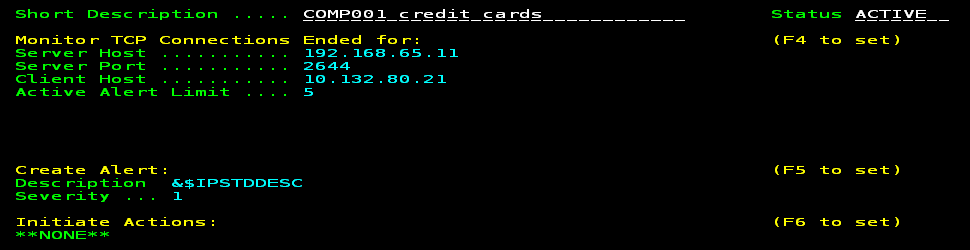
The definition monitors a connection between the CICS region that processes credit card transactions and the customer (COMP001) device that requests the transactions. If a requested transaction cannot be processed, the customer is entitled to financial penalties. The connection is critical to the business. If the connection is terminated, the event detector raises a severity one alert.
The following process shows you how to define the detector:
Example: Event Detector That Alerts on Secure Sockets Layer Handshake Failures
This example shows an event detector that sends an email to a security account when Secure Sockets Layer (SSL) handshake failures occur for a particular server. This condition can indicate that an unauthorized client is attempting to access a secure server or that an authorized client is having difficulties accessing the server. When the event is detected, an email is sent to notify interested parties of the condition.
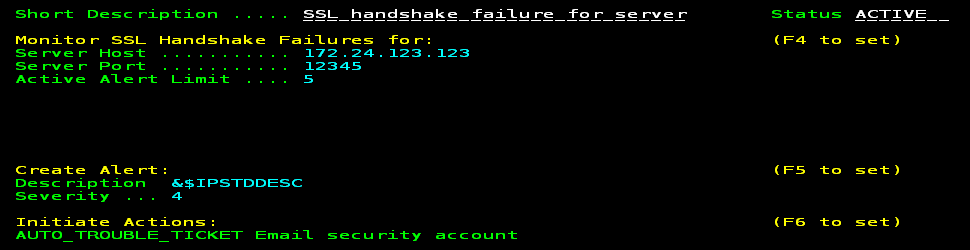
In the definition, 172.24.123.123 is the IP address and 12345 is the port number of the secure server. If a connection is established with this server by any client and the SSL handshake negotiations fail, then an alert is raised and an email notification is sent. The automatically generated alert text is used, for example:
SSL handshake failure: TCP server 172.24.123.123:12345 client 10.0.0.100 stack TCPIPA
Note: The email feature relies on the definition of the email trouble ticket interface. Depending on the definition, you can specify that emails be sent to one or more addresses. You can enter the /ALTTI shortcut to define the interface.
The following process shows you how to define the detector:
| Copyright © 2012 CA. All rights reserved. |
|