Installing Your Product Using CA MSM › How to Use CA MSM: Scenarios › How to Configure a Product
How to Configure a Product
The Software Configuration Service (SCS) facilitates the mainframe product configuration from the software inventory of the driving system to targeted z/OS operating systems.
You can use the SCS component of CA MSM to configure a CA Technologies product that you have already acquired, installed, and deployed.
You perform the following high-level tasks to configure your products using CA MSM:
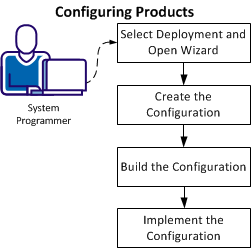
- From the Deployments tab, select a configurable deployment, select the associated product, and click Create Configuration to open the Configuration wizard.
- Create the configuration by completing all the steps in the wizard:
- Define a configuration name and select a target system.
- Select configuration functions and options.
- Define system preferences.
- Create target settings.
- Select and edit resources.
- Build the configuration. The last step of the Configuration wizard lets you build the configuration. If needed, you can edit the configuration and can build the configuration again.
- Implement the configuration. The implementation process in CA MSM guides you and provides detailed instructions to start, stop, and manage the steps of the implementation process.
After the configuration process completes, the product is ready for you to use. Sometimes there are other steps to perform manually outside of CA MSM.
Note: You cannot use CA MSM to configure a product to a staging system.
|
Copyright © 2012 CA.
All rights reserved.
|
|

