

|
|
|
The system registry is a repository of variable data that all CA MSM managed products share. The system registry repository contains information about the systems that have been defined to CA MSM and selected as a target for deployments and configurations. You can create non-sysplex, sysplex, shared DASD cluster, and staging systems. You can maintain, validate, view, and delete a registered system and you can investigate a failed validation.
For each system that you register, there is one entry. Each entry consists of three categories of information: general, network locations, and data destinations.
You perform the following tasks to set up the system registry in CA MSM:
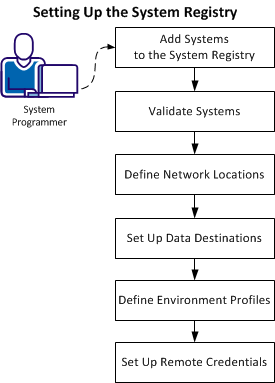
Add and then validate each nonstaging system in the enterprise that you are deploying to, to the CA MSM system registry. You can only send a deployment to a validated system.
This process applies to each nonstaging system in your enterprise. For example, if you have five systems at your enterprise, then perform this process five times.
Note: After a system is validated, there is no need to validate it again. However, you can revalidate a system any time.
| Copyright © 2012 CA. All rights reserved. |
|