

|
|
|
The Software Deployment Service (SDS) facilitates the mainframe product deployment from the software inventory of the driving system to the target system. This facilitation includes deploying installed products that are policy-driven with a set of appropriate transport mechanisms across a known topology.
You can use the SDS component of CA MSM to deploy a CA Technologies product that you have already acquired and installed.
You perform the following high-level tasks to deploy your products using CA MSM:
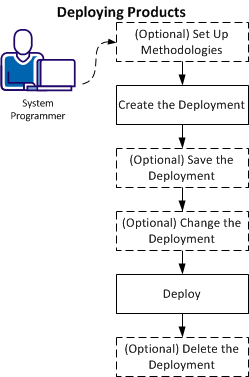
Note: You can also set up methodologies when creating a deployment.
After the deployment process completes, the product is ready for you to configure. Sometimes there are other steps to perform manually outside of CA MSM before beginning the configuration process.
| Copyright © 2012 CA. All rights reserved. |
|