Introduction › How the Product Works
How the Product Works
CA NetMaster FTM is a VTAM application program that runs as an MVS started task on a z/OS system. A running instance (an MVS address space) is called a region (file transfer management region). The following illustration shows the main product components and the flow of data:
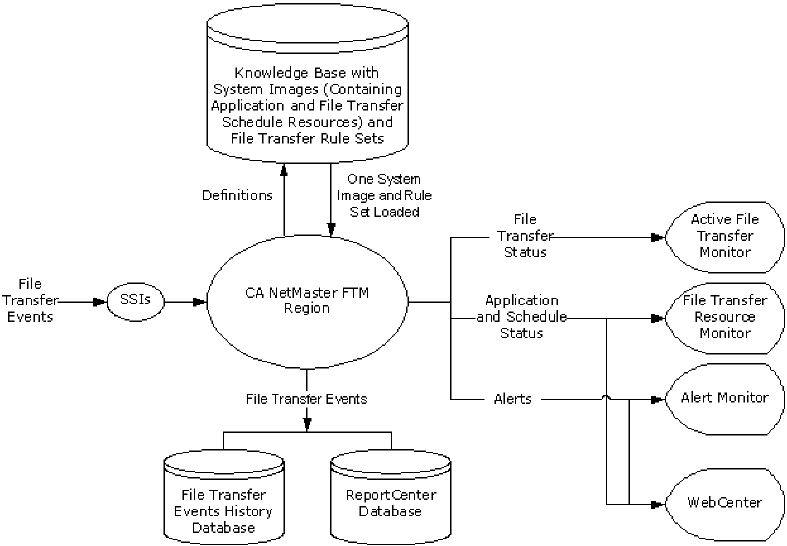
File transfer events are processed as follows:
- Two subsystem interfaces (SSIs) are available to process events before the events are passed to the region: SOLVE SSI and NMFTP Monitor SSI. The SSIs are separate address spaces that run on the same system. Depending on the application that performs the transfer, an event may be processed by none, one, or both of these SSIs. For example, events from CA SOLVE:FTS go to the region directly, while FTP file transfer events from IBM's Communications Server are processed by both SSIs.
Note: For more information about file transfer event flows, see the Administration Guide.
- When the region receives the file transfer events (and system events), it acts on them according to the definitions in the loaded system image and file transfer rule set. A system image contains resource definitions such as file transfer application managers and file transfer schedule monitors; a rule set contains file transfer rules. You can define multiple system images and file transfer rule sets in the region's knowledge base, but only one of each is loaded and active.
- Based on the information in the events, the region presents the health of your file transfer service on various displays. You can define filters to select what you want to display.
- The Active File Transfer Monitor shows the status and details of individual transfers (for example, a transfer has started and is in progress). You can terminate transfers from this display.
- The File Transfer Resource Monitor shows the status of managed applications and file transfer schedules (for example, the time when a schedule will start).
- The Alert Monitor shows alerts that warn you of any problems or critical activities (for example, an alert indicating a transfer failure generated by a file transfer rule because the rule criteria are satisfied).
- WebCenter provides a web-based display for application and schedule status, and alerts.
- The region stores start, completion, and failure event records in a history database and, if ReportCenter is configured, in the ReportCenter database. These databases let you report on file transfer activities, which can help you plan your file transfer service. Reports on the history database are 3270-based; while reports on the ReportCenter database are web-based, using WebCenter, and provide a richer presentation with graphs.
|
Copyright © 2008 CA.
All rights reserved.
|
|

