Setting Up File Transfer Resources › How Managed CONNECT:Direct Regions Work › Implement Statistics Exits in the Managed CONNECT:Direct Regions
Implement Statistics Exits in the Managed CONNECT:Direct Regions
Note: The File Transfer statistics exit in each managed CONNECT:Direct region must be current for the version of CA NetMaster FTM you are running.
Follow these steps:
- Include the supplied APF-authorized CC2DLOAD library in the STEPLIB DD statements of the CONNECT:Direct startup JCL procedure. (The library is set up as dsnpref.NMC1.CC2DLOAD.)
- Depending on your current CONNECT:Direct setup, update the following statement in the dsnpref.NMC1.CC17SAMP(NMCDSTEX) statistics exit as required:
$RFCDSTX
AMODE=31,USREXIT=NONE,EPSRCVR=$RFFTEVR,
EXCLUDE=NONE
Important! If modifications are required, copy the distributed member to the TESTEXEC data set for the region for modification.
- If you are already using a CONNECT:Direct statistics exit, specify the load module name of your exit in the USREXIT parameter.
- If you are excluding records from the CONNECT:Direct statistics file, copy the list of excluded record types to the EXCLUDE parameter. Remove STAT.EXCLUDE from the CONNECT:Direct initialization parameter.
- Ensure that the value of the EPSRCVR parameter matches the CONNECT:Direct event receiver ID specified in the CDAPI parameter group of CA NetMaster FTM. Multiple CONNECT:Direct regions can use the EPSRCVR ID concurrently.
Note: The NMCDSTEX member also contains comments that provide additional background information.
- If you updated the NMCDSTEX statistics exit in TESTEXEC, perform the following steps:
- Copy the ASMCDSTX job from the dsnpref.NMC1.CC17SAMP library to the dsnpref.NMC1.rname.JCL library.
- Customize the ASMCDSTX job in the dsnpref.NMC1.rname.JCL library, following the instructions in the file.
- Submit the customized job to assemble and link edit the exit.
- Change the value of the CONNECT:Direct initialization parameter, STATISTICS.EXIT, to NMCDSTEX.
NMCDSTEX is the default statistics exit name. If you assemble and link edit the exit manually, the statistics exit name you specify must match the exit name specified in the ASMCDSTX job.
Example: One Region
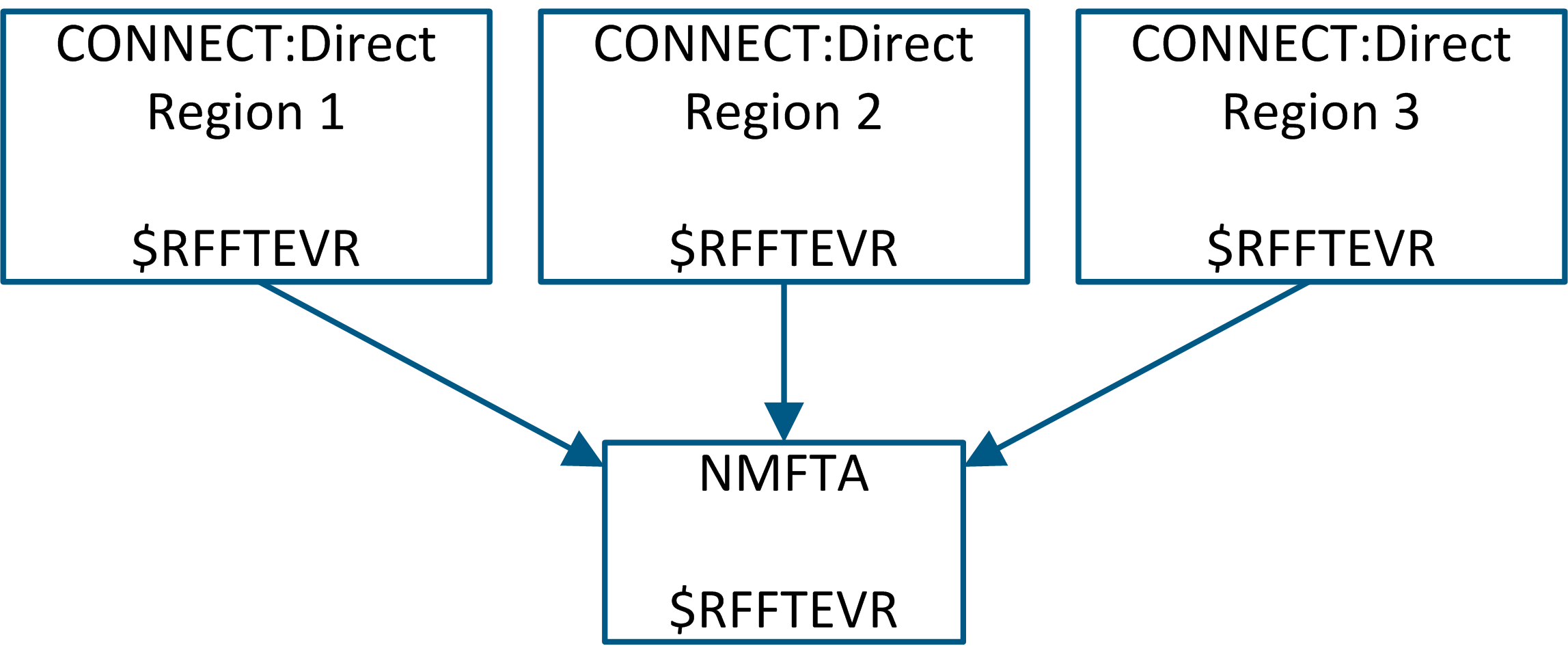
In this example, there is only one product region (NMFTA) within one LPAR. The event receiver ID in the CDAPI parameter group of NMFTA is configured with a value ($RFFTEVR). Usually, all the CONNECT:Direct regions in the LPAR are configured with the same event receiver ID in their statistics exits so that region NMFTA can monitor them.
Example: Multiple Regions
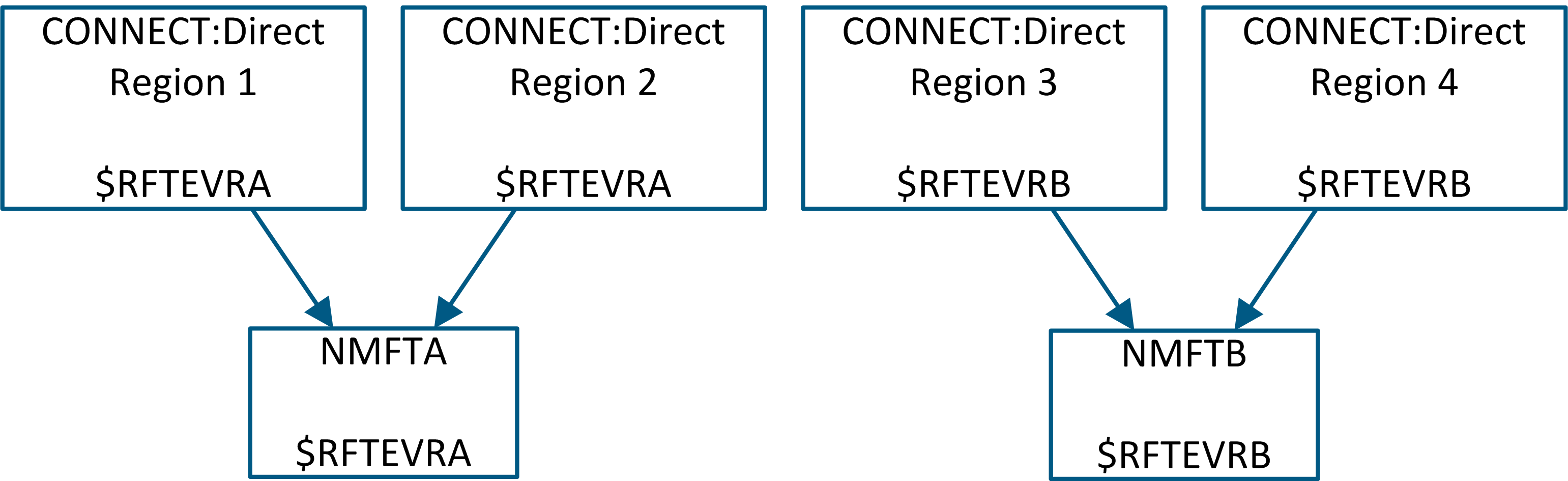
This example has two product regions (NMFTA and NMFTB) within one LPAR. The event receiver ID in the CDAPI parameter group of NMFTA is configured with $RFTEVRA and NMFTB is configured with $RFTEVRB.
The event receiver ID in the statistics exits of individual CONNECT:Direct regions determines the scope of monitoring for each FT region. In this example, NMFTA monitors CONNECT:Direct Region 1 and CONNECT:Direct Region 2 while NMFTB monitors CONNECT:Direct Region 3 and CONNECT:Direct Region 4.
|
Copyright © 2012 CA.
All rights reserved.
|
|

