

|
|
|
EventView provides the following functions:
The following illustration shows how EventView works.
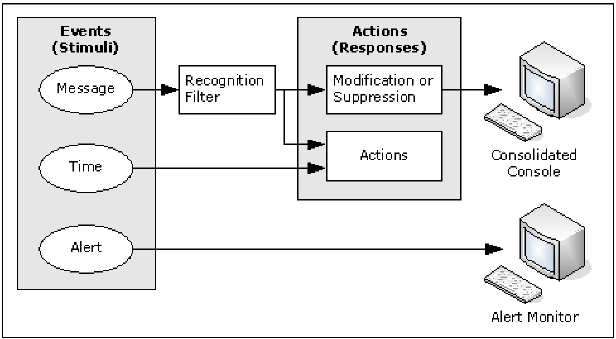
You can define event rules to do the following:
Rules are grouped logically into rule sets, which define how an event is processed and what actions are taken in response to an event that is not related to a resource. (Resource-based events are handled by ResourceView.) An event can be a message or a specified time.
EventView provides the following samples of message suppression rule sets:
Note: For the IBM recommended lists, see IBM’s MVS Initialization and Tuning Reference guide.
You can monitor message flows from multiple systems on a single screen—the consolidated console. Console consolidation controls the way you see messages on the console. In addition, messages displayed on the consolidated console are affected by EventView processing.
For example, message text and message presentation can be modified by EventView, and the consolidated console user sees the modified message. If EventView suppresses a message, that message is not displayed on the consolidated console.
You can define message profiles that customize the view of the message flow. Different users can have different sets of message profiles to suit the functions they perform.
Message profiles enable the meaningful grouping of messages based on criteria such as system, message ID, job name, and system codes.
| Copyright © 2010 CA. All rights reserved. |
|