The following security functions can be implemented by using the user ID security exit:
Each of these functions is described below.
Access to your system is controlled by providing user logon security. Your exit needs to be able to perform the following functionality:
The exit is called to accept logon attempts from the following sources:
When a user attempts to logon, the user ID and password (if applicable) is passed to the exit for confirmation that the logon can proceed.
When a partial security exit is installed, and the user ID is defined on the UAMS data set, the user ID attributes are also passed to the exit.
EIP logons can originate from TSO or BCI. These calls do not need to supply a password.
Note: A z/VM system can receive a TSO interface logon from an OS/VS system, so the exit should be written to handle this.
ROF logon requests might originate from domains that implement differing levels of security. In order to assist the exit to reach a decision with ROF logon requests, the following information is provided to the exit:
The SIGNON command allows a password to be specified. The exit can check whether a password was specified for a ROF logon, and refuse the logon if no password was specified.
When an operating system console is first attached, a logon request is made. The exit can return user ID information applicable to the profile required for the particular console or it can indicate that the user ID is unknown.
A logon call is generated for each system environment during system or procedure initialization. No passwords are associated with system environment logons.
If the exit rejects the logon by setting return code 24, default values are assigned for the system environment logon.
When an APPC transaction is defined with conversation level security, an APPC user region logon is performed to validate and sign on the partner transaction program region.
Depending on the type of APPC logon being performed, a password may or may not be provided. If one is provided, it should be checked. If none is provided, it indicates that the region is being started from a known, valid environment. In this case the user ID should be validated, with no password check.
Using a partial security exit allows more flexibility with model user IDs. The following scenarios can be specified in the exit:
In this manner, the exit has complete control over both known and unknown users wishing to log on to your region.
When a model is specified, the exit changes the value of the 8-character user ID name addressed by word 3 of the Logon Request parameter list, to the user ID name for the nominated model user ID. You can define many model user IDs, for example, ADMIN, NETOP, SYSOP, or SYSPROG.
The exit should validate both user ID and password before allowing an automatically modeled user creation. Otherwise, simple mistakes from mistyped user IDs might generate spurious user ID definitions on the UAMS data set.
Note: Model users take precedence over changes to the user ID. If the exit specifies a model user ID but the model is itself not defined on UAMS the logon attempt is rejected with a user not known condition. This is the case regardless of whether the user is defined on UAMS or not, and the logon fails.
By default, all users defined using the model user ID are new users, and all new users have to change their password when they first log on. This is not convenient if users have the same password for all systems.
To avoid this situation, the partial security exit must indicate that the logon password is correct and that the user ID is to be created and treated as an existing user ID. This means that a password change is not enforced before allowing the logon.
If an unknown user logs on and is automatically given a new user ID based on a model designated by the exit, the new user ID is created on UAMS:
When a user is logged on to the system, there are times when their password needs to be verified. Password verification is needed in the following circumstances:
Logon verification functionality is supplied by the &SECCALL CHECK verb. When there is no external security package being used, &SECCALL CHECK is handled by UAMS.
The following points should be considered when model user IDs are subject to logon verification:
Verification is also required when an APPC link is started and the link is defined with PASSWORD=EXIT.
The exit is designed to use SAF APPCLU class. When a request for an APPC link is made, session partners are passed to the exit as an entity defined to the SAF security system in the following form:
NETID.LU1.LU2
where LU1 is the requesting system and LU2 is the target system. To remove the necessity to define NETID.LU1.LU2 and NETID.LU2.LU1 with the same session key, you should specify the security exit to swap LU1 and LU2.
To ensure the security of your system, users must have the ability to change their password in the following circumstances:
When a user is logged on to your system, they can enter commands that require the retrieval of their user ID attributes. You must provide this functionality in the following circumstances:
The required user ID information is returned as a set of structured fields.
If you have a partial security system, your region retrieves the definition of the required user ID from UAMS and presents its definition to the exit as a set of structured fields for inspection or modification before completing the request.
If you have a full security system, the security exit must provide all the structured fields for the user definition.
User IDs must be updated when information pertaining to the user has changed. You must provide this functionality in the following circumstances:
Updating a user ID requires the ability to retrieve user ID information.
If you do not want to override any user attributes from UAMS, then the parameter list should be returned unchanged and the return code set to zero. This applies to partial security exits only.
The exit does not need to support the ability to update user IDs, but if it does not, some other method of changing a user's INITCMD and user details must be available.
You can add your own functions to the security exit; for example, to obtain statistics about the exit's performance. The &SECCALL EXIT statement provides this functionality by allowing you to communicate between the security exit and NCL procedures. Communication is performed by passing the contents of nominated variables to your security exit.
On return to the NCL procedure the contents of the variables, passed as parameter areas, are placed in individual NCL variables named &1, &2, &3, and so on. A parameter area that was assigned a zero data length by the exit sets a null value.
Note: The exit can return only as many variables to the NCL procedure as were nominated on the original &SECCALL EXIT statement.
Example:
To obtain statistics about the number of logons performed by the security exit, set the following variables:
&A=GETSTATS
&B=LOGONCOUNT
&C=
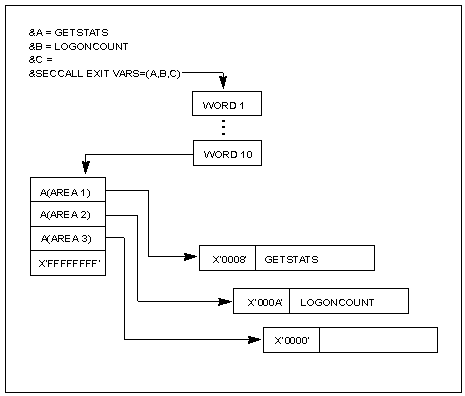
These variables are passed to the exit as parameters by the &SECCALL EXIT VARS=(A,B,C) statement. The exit modifies the contents of these parameters, setting the data length in the first 2 bytes of the parameter area. The maximum length of the parameter area is 256 bytes.
The following diagram shows how the exit deals with an &SECCALL EXIT call.
When the exit returns the variables to the NCL procedure, the values of the parameter areas are placed in &1, &2, and &3.
The exit can also set a return code that is passed back to the NCL procedure as the value of the system variable &RETCODE. In addition, the exit can supply a message which is returned to the procedure in &SYSMSG.
&SECCALL EXIT is available for use in any NCL procedure, but is valid only in systems which are configured with a security exit.
Note: For detailed information about &SECCALL EXIT, see the Network Control Language Reference Guide.
You can obtain a list of all the user IDs defined to your system. To build this list, you must retrieve sequential user IDs. This functionality is performed by the OPT=KGT or OPT=KLT option of the &SECCALL GET NCL statement. This statement retrieves user ID definition details for an NCL procedure of the next (KGT) or previous (KLT) user ID defined following a nominated user ID name.
If you use a partial security exit, this call is not made to the exit. A sequential get is performed on the UAMS data set and then a specific return user ID information call is passed to the security exit.
You must be able to add a new user ID definition so that a new user can access the system. This functionality is provided by the following:
If you use a partial security exit, and you do not want to override any of the attributes, the return code must be set to zero and the parameter list returned unchanged for the user definition to be added to the UAMS data set.
If you use a full security exit, this function need not be implemented as it is performed by your external security package.
You must be able to delete a user ID definition. This functionality is provided by:
If you use a full security exit, this function need not be implemented as it is performed by your external security package.
If the user logging on is defined to UAMS, their user ID definition privileges are presented to the exit as a list of structured fields. This list is addressed by word ten of the logon request parameter list.
By translating the definition of a known user ID into structured fields and presenting them to the exit at logon time, the exit is given the opportunity to inspect or modify the attributes and privileges of the user who wishes to log on.
The exit cannot add structured fields to the list provided on the call but the following actions can be taken: