

For advanced filters, the syntax that is written to the Conditions field automatically conforms to vendor specifications for capture card compatibility. Review the generated expressions, especially the placement of the parentheses that group the expressions, to verify that they are evaluated in the correct order. For example, the following grouping:
(A OR B) AND C
has a different result than this grouping:
A OR (B AND C)
You can edit the syntax in the Conditions field.
Multi-Port Monitor filtering includes packets that match the criteria. Take special care when creating filters that exclude packets from specific hosts or subnets. Discuss any questions about expression syntax with CA Technical Support.
Example
You want to ignore a conversation between Host A (192.168.32.15) and Host B (10.10.21.10). The conversation represents an automatic backup process that runs once per week and skews the baseline each time. You want to report on “all other traffic.” You also want to retain all packets from traffic that travels to hosts other than the excluded pair. So you create a filter that retains the following packets:
In the Conditions field, the proper syntax looks like the following example:
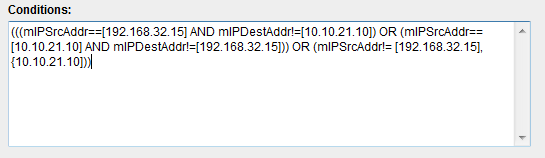
If written in English, the expression you create reads something like the following example:
(IP Source Address EQUALS 192.168.32.15 AND IP Destination Address does NOT EQUAL 10.10.21.10) OR (IP Source Address EQUALS 10.10.21.10 AND IP Destination Address does NOT EQUAL 192.168.32.15) OR (IP Source Address does NOT EQUAL 192.168.32.15, 10.10.21.10)
When creating an advanced filter with regular expressions, select "Equals" to insert "==." Select "Not Equals" to insert "!=."
|
Copyright © 2015 CA Technologies.
All rights reserved.
|
|