

As a systems administrator or architect, you want to generate the device packs for CA Mediation Manager for Infrastructure Management for deployment to Data Aggregator and Data Collector to monitor data from devices or the Element Management System (EMS).
Note: Currently, the device pack generator in CA Mediation Manager for Infrastructure Management provides the following features:
You use the application to generate your device packs. The application is installed after you extract the contents of the ems_installer.zip file and run the installation.
Note: For information about how to install, see the Install or Upgrade Device Packs section in the CA Mediation Manager and CA Mediation Manager for Infrastructure Management Installation Guide.
After you extract the files, the directory named IMDevicePackGenerator_<version> contains the following subdirectories:
Contains the following files and folder:
Contains the java libraries that run this application
Contains an empty device pack configuration file and different sets of sample CSV input files, each with their specific devicePackConfig.xml file:
The configuration file contains the required information to create the CA Infrastructure Management device packs using these sample CSV input files. The sample CSV input files help you understand how the application functions. The files can also help you modify the input files in the devicePackConfig.xml file so that you can create a device pack.
The following diagram shows the work flow for this task:
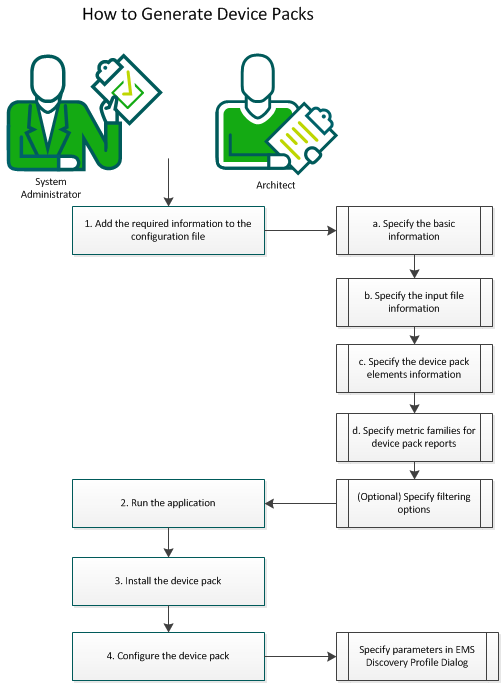
To generate the device packs, follow this process:
|
Copyright © 2014 CA.
All rights reserved.
|
|