

During a CA Mediation Manager installation on Windows, the Generic Executor and the Web component are registered as Windows Services. The service names are CAMM-GE-{user}-{port}, and CAMM-tomcat7-8880.
By default, these services are manually started. Similar to Linux, in Windows you can execute init.camm.install.bat so that CA Mediation Manager starts automatically at system startup, and automatically stops at system shutdown:
C:/CAMM/tools/init.camm.install.bat
The command init.camm.uninstall.bat removes this setting:
C:/CAMM/tools/init.camm.uninstall.bat
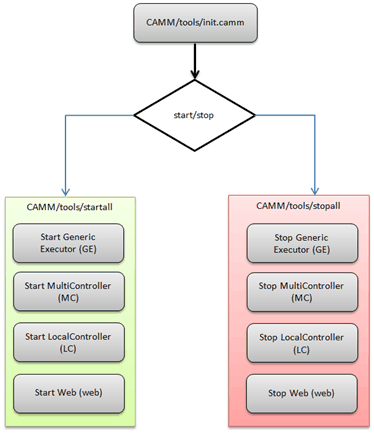
The following diagram illustrates the process flow of starting and stopping services:
|
Copyright © 2013 CA.
All rights reserved.
|
|