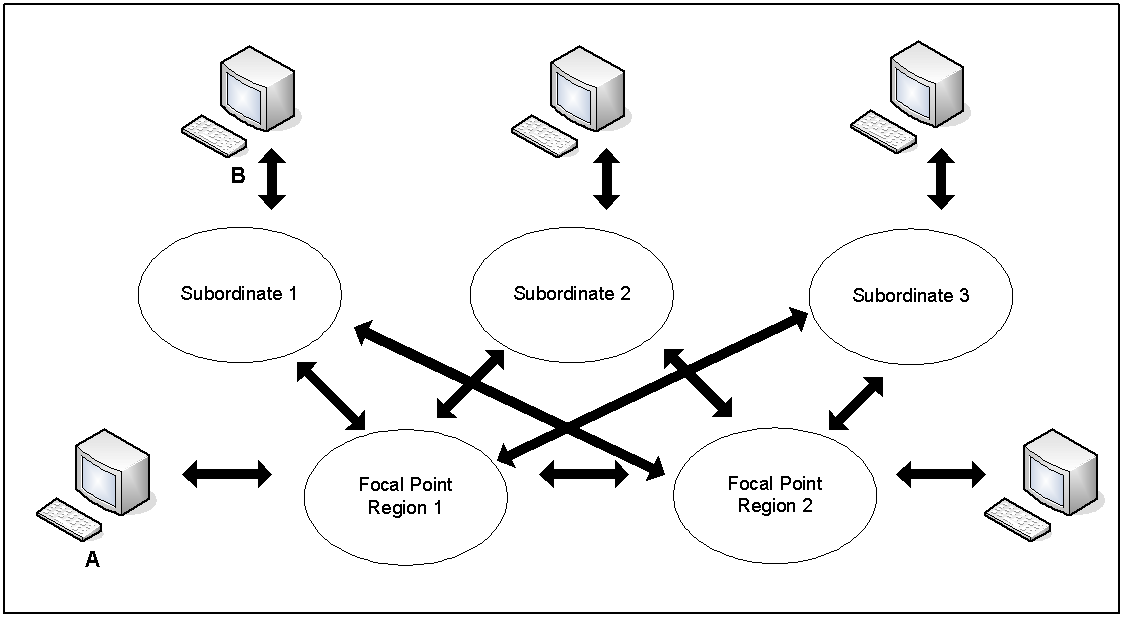
Your product provides focal point management to support multisystem operation, that is, management at a focal point with subordinates and other focal points feeding information to it, as follows:
Supports full connectivity between multiple regions. Regions linked in this way are known as focal point regions.
When regions are communicating with each other, authorized users can monitor and control all managed resources from any terminal connected to any region.
All focal point regions have the knowledge base synchronized.
Enables you to reduce the amount of traffic in your multisystem environment. You link subordinates to focal point regions that provide central monitoring and control. A subordinate has visibility and control of the resources that belong to the local system image only.
In a multisystem environment, each region runs independently of the other regions. If no communication links are available, each region still provides full monitoring, control, and automation of its own managed resources.
To link a focal point region to another focal point region, or to link a subordinate to a focal point region, you need to link and synchronize the regions.
Notes:
The following diagram shows an example of a multisystem environment. Logging on to Console A allows visibility to all resources. Logging on to Console B allows visibility to the subordinate system image only.
Notes:
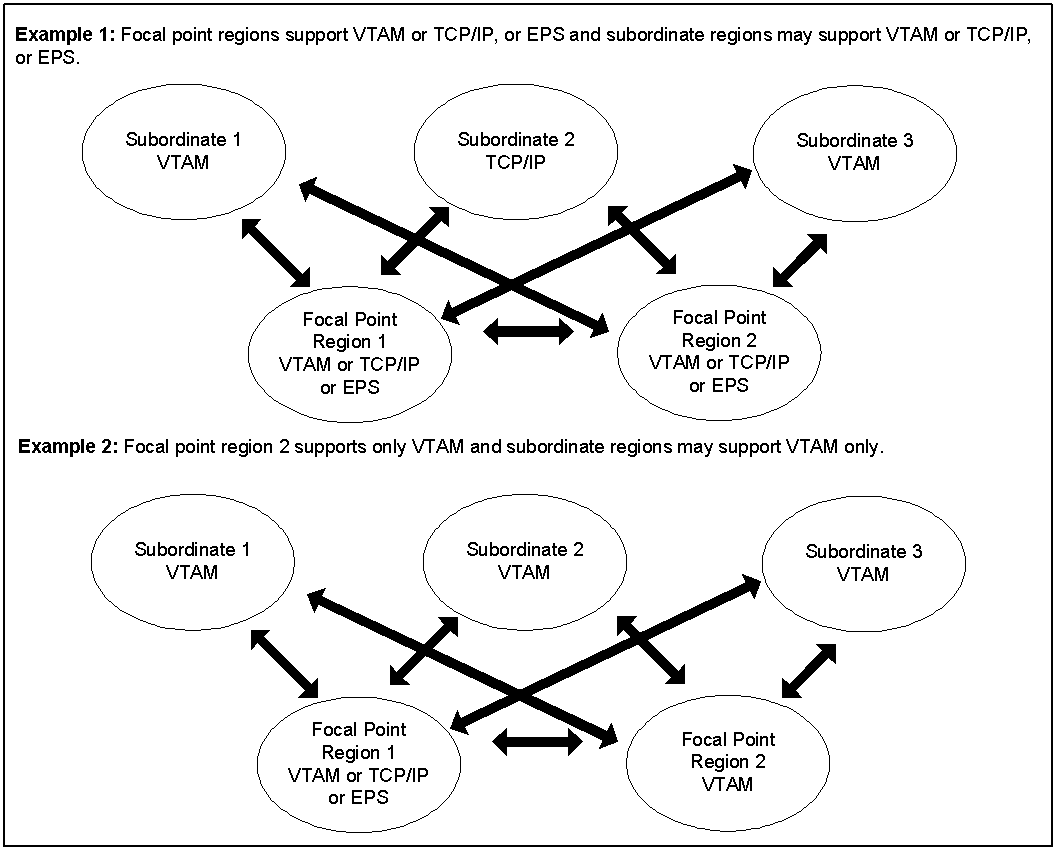
The link established between two regions in a multisystem environment is an INMC link. The link is used to pass knowledge base updates, status change notification, and other information between the two regions. The link can use any combination of the following communications protocols: VTAM, TCP/IP, and EPS. VTAM is the default.
For each region, the communication access methods available to it are specified by the MULTISYS Customizer parameter group. If TCP/IP is used, you must also ensure that the SOCKETS parameter group is activated.
Note: When a region is linked in a multisystem environment, you cannot change the access methods in its MULTISYS parameter group without first unlinking the region.
The INMC link between any two regions uses the access methods enabled by both regions (that is, the intersection of the two MULTISYS parameter groups). When multiple access methods are enabled, the link can use all these methods. This improves reliability because the link functions when one of the enabled methods is available.
When you plan your multisystem environment, you must ensure the following:
This following diagram shows some examples of multisystem link configurations.
With the EPS access method, you can use the sysplex cross-system coupling facility (XCF) to implement your multisystem environment.
Notes:
When you implement your multisystem environment, consider the following:
When you install your product, two databases are downloaded. These databases, which can be customized to suit your requirements, are:
Together, these databases form the knowledge base.
Populate these databases with definitions specific to your environment. These definitions may include the system image definitions for any other regions that you want to install in your environment in the future.
As you establish regions, link the new regions to the first region by using the Link Region and Synchronize Database option. When databases are linked, future synchronization is automatic. You can make changes to the database in one region and the changes are sent to the databases in the linked regions that have visibility to those resources and system images.
Note: Synchronization does not apply to the NCL procedures represented by the registered commands and macros. Changes to these NCL procedures are not automatically reflected in the linked regions.
In a multisystem environment, you can monitor and control the resources in all linked regions from a single focal point.