

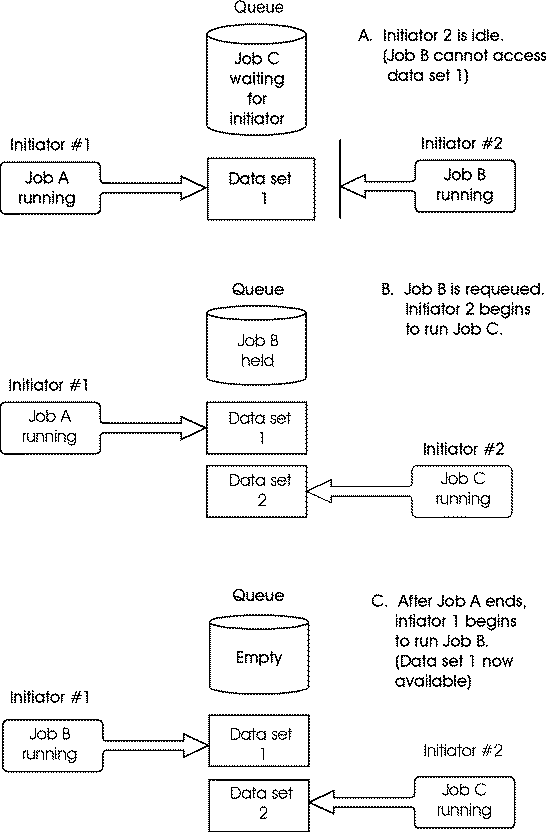
The Problem: When a batch job is submitted, the initiator task issues a SYSDSN RET=ECB type ENQ request for every data set on all DD cards in the JCL. All ENQ requests must be obtained before the batch job begins execution. If any data set is not available, then the initiator goes into a WAIT state until all data sets become available. This prevents another job from using this initiator until the first job completes. This is true even if the data sets of other job are currently available.
ENQs Eligible for Job Requeue
Specifying ECMF REQUEUE requeues only batch jobs that contend for SYSDSN RET=ECB type ENQ requests issued from an initiator task at job initiation. SYSDSN ENQ requests that result from dynamic allocation or at the step level are not eligible to be REQUEUED.
GDGs
When a batch job is submitted, and relative GDGs are referenced in the JCL, the initiator issues SYSDSN ENQ requests for the base GDG name. For example, if STEP3 of a batch job contains a DD for DSN=SYSPROG.DUMP(+2), then an ENQ request is issued for QNAME=SYSDSN RNAME=SYSPROG.DUMP at job initiation. Later, when STEP3 runs, another ENQ request is issued by STEP allocation on the resolved GDG name, or G0000V00 (SYSPROG.DUMP.G0005V00).
If this ENQ request is not available, then the MIM1038 and MIM1039 ECMF messages are issued, but the job will not be requeued. If ECMF requeued the job, and then later released it, previous steps would be rerun, and this could cause data to be corrupted.
SYSZVOLS ENQ
ECMF does not requeue a batch job that contends for the SYSZVOLS QNAME. This ENQ is issued during step initiation after the job has already started. If ECMF requeued the job, and then later released it, previous steps would be rerun, and this could cause data to be corrupted.
Aliases
Aliases are handled the same as GDGs. These are not resolved until STEP initiation, and so are not eligible for REQUEUE.
First Job Step
If an ENQ request is issued for the first step of a job, but after job initiation has completed, then ECMF will not requeue the job.
Requirements
Note: For more information on allocating a checkpoint file, see the CA MIM Programming Guide.
How It works
First, ECMF detects whether all requested resources are currently available to a batch job. If not, then ECMF issues MIM1038/MIM1039/MIM1040 messages until the REQAFTER value expires. At this time, CA MIM executes the JES2 commands to requeue the batch job. Specify the REQAFTER option on the SET ECMF command in the commands member. The value for this option is the number of REPORTCYCLEs on the SYSDSN QNAME that ECMF must wait before it requeues the batch job.
Example:
In the MIMQNAME member, issue the following statement:
SYSDSN GDIF=YES SCOPE=SYSTEM REPORTAFTER=0 RPTCYCLE=60 ECMF=YES EXEMPT=YES
In the MIMCMNDS member, issue the following statement:
SET ECMF REQAFTER=3
ECMF waits 3(REQAFTER) X 60(REPORTCYCLE) = 180 seconds before it requeues the batch job. You can change these values dynamically using the ALTER and SET ECMF commands.
After this timer expires, the following JES2 commands are executed:
$HJxxxxx
$EJxxxxx
$CJxxxxx
The JES2 command character in this example is $. ECMF dynamically determines the appropriate JES2 subsystem command character. Also, these JES2 commands are executed using the UTOKEN of the address space of the batch job. If you want these commands to be executed using the UTOKEN of the CA MIM address space, then use the SET ECMF REQSECUR=ON command.
After these commands are issued, the job is removed from the initiator, and stays in the HELD queue until the resource becomes available. The following message displays:
MIM1083 jobname(jesid) REQUEUED - AWAITING DATASETS
ECMF determines resource availability, both locally and globally, of all required resources for all DD cards in the JCL of the batch job. This check is performed every REQCYCLE, as coded on the SET ECMF REQCYCLE command. The default is 30 seconds. After ECMF determines that ALL resources are now available, it executes the $Ajxxxxx JES2 command to release the batch job.
The following message is issued:
MIM1048 jobname(jesid) RELEASED - DATASETS NOW AVAILABLE
The following graphic illustrates this process:
|
Copyright © 2014 CA.
All rights reserved.
|
|