

Service Class by SYSPLEX
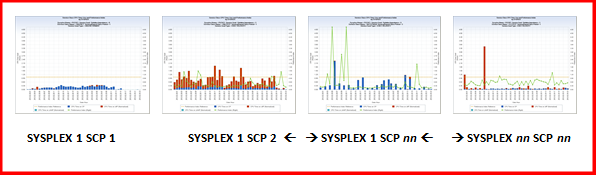
Note: RCP=Report Class Period
SECCPUTM – CPU Time on CP
SECSUPTM – CPU Time on zIIP (Normalized)
SECZAPTM – CPU Time on zAAP (Normalized)
SECPINDX – Performance Index
Performance Index
Reference (value that is set at 1)
HHMM – Hour: Minute
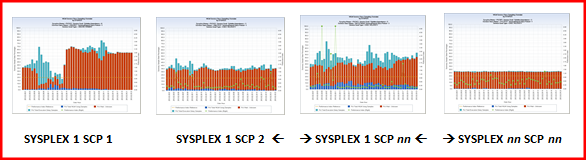
SEDPCUSE – Pct Total WLM Using Samples (derived in query code)
SEDPCDUN – Pct Wait – Unknown
SEDPCSAM – Pct Total Execution Delay Samples (derived in query code)
SECPINDX – Performance Index
Performance Index Reference – value set to 1
HHMM – Hour: Minute
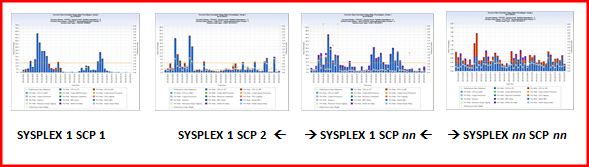
SEDPCDCP – Pct Wait – CPU on CP
SEDPCSUD– Pct Wait – CPU on zIIP
SEDPCZPD – Pct Wait – CPU on zAAP
SEDPCAMD – Pct Wait – Crypto AM Processor
SEDPCAPD – Pct Wait – Crypto Assist Processor
SEDPCCRD – Pct Wait – Crypto Processors
SEDPCCOD – Pct Wait – Resource Contention
SEDPCDCC – Pct Wait – CPU Capping
SEDPCDQU – Pct Wait – Quiesce
SEDPCDMP – Pct Wait – MPL Delay
SEDPCSMP – Pct Wait – Server MPL
SEDPCDRG – Pct Wait – Resource Group Capping
SEDPCDSD – Pct Wait – DASD I/O Delay
SEDPCSQU – Pct Wait – Server Queue Delay
SECPINDX – Performance Index
Performance Index Reference – value set to 1
HHMM – Hour: Minute
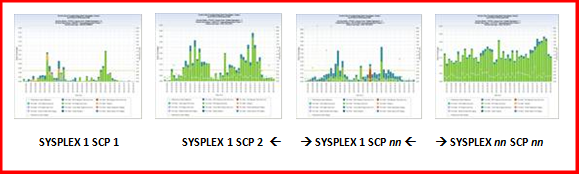
SEDPCDES – Pct Wait – ESO Hiperspc Pg-In from Aux
SEDPCDHS – Pct Wait – Std Hiperspc Pg-In from Aux
SEDPCDPC – Pct Wait – CSA Page-In from Aux
SEDPCDPP – Pct Wait – Pvt Page-In from Aux
SEDPCDSI – Pct Wait – Swap-In
SEDPCDVI – Pct Wait – VIO Page-In from Aux
SEDPCDXM – Pct Wait – Cross Mem Page-In from Aux
SEDPCSHP – Pct Wait – Server Hiperspace Paging
SEDPCSPP – Pct Wait – Server Private Area Paging
SEDPCSSI – Pct Wait – Server Swap-In
SEDPCSVP – Pct Wait – Server Space VIO Paging
SECPINDX – Performance Index
Performance Index Reference – value set to 1
HHMM – Hour: Minute
Service Class by SYSPLEX CPCUID
Data extract Service Class by SYSPLEX CPCUID provides the same four Q&R chart views, with charts displaying the same Y and X axis charted data elements, as those described for data extract Service Class by SYSPLEX.
The only difference is that additional charts are generated if the SYSPLEX spans multiple CPCs. Where the chart granularity for the SYSPLEX level data extract followed this pattern:

The chart granularity for the Service Class by SYSPLEX CPCUID data extract follows this pattern:

If a SYSPLEX spans two or more CPCs, the the SYSPLEX CPCUID level data extract will generate more unique charts that the SYSPLEX level data extract.
If a SYSPLEX does not span CPCs, however, the number of unique charts generated by the SYSPLEX level and SYSPLEX CPCUID level data extracts will be identical.
Service Class by SYSPLEX CPCUID SYSID
Data extract Service Class by SYSPLEX CPCUID SYSID provides the same four Q&R chart views, with charts displaying the same Y and X axis charted data elements, as those described for data extract Service Class by SYSPLEX.
The only difference is that additional charts are generated if the SYSPLEX spans multiple CPCs, or multiple z/OS LPARs.
Where the chart granularity for the SYSPLEX level data extract followed this pattern:

The chart granularity for the Service Class by SYSPLEX CPCUID SYSID data extract follows this pattern:

With this data extract, you can examine the performance of each Service Class Period on each z/OS LPAR.
|
Copyright © 2014 CA.
All rights reserved.
|
|