|
|
|
Each job box in the Graphical Display window contains two symbols. The symbol in the upper-left corner indicates the last completed status of that job. The symbol in the bottom-right corner indicates the current state of that job.
For example, the hand symbols in the following job box indicate that the job ran successfully last time, and is currently on hold.
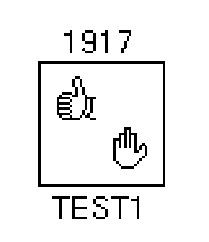
The following table describes the symbols displayed in job boxes.
|
Symbol |
Job State |
Definition |
|---|---|---|
|
|
Failure |
The last time the job ran, it failed. |
|
|
Success |
The last time the job ran, it completed successfully. |
|
|
Unknown |
The job has never run, so the last completion status is unknown (0). |
|
|
Scheduled |
The job is scheduled to run. |
|
|
Job Slot Wait |
The manager is running the maximum number of jobs on all nodes; the job is waiting for execution. One or more other jobs need to finish before this job runs. |
|
|
Dependency Wait |
The job is waiting for a job dependency to be satisfied before it can run. |
|
|
Hold |
The job is on hold. |
|
|
Running |
The job is currently running. |
|
|
Queued |
The job is scheduled to run in a BATCH queue, and is waiting for execution. |
Note: When the job status of an unselected job on a remote node changes, the symbols in the job box are not updated.
| Copyright © 2012 CA. All rights reserved. | Tell Technical Publications how we can improve this information |