

A breakpoint is an intentional stopping or pausing place in a program, put in place for debugging purposes.
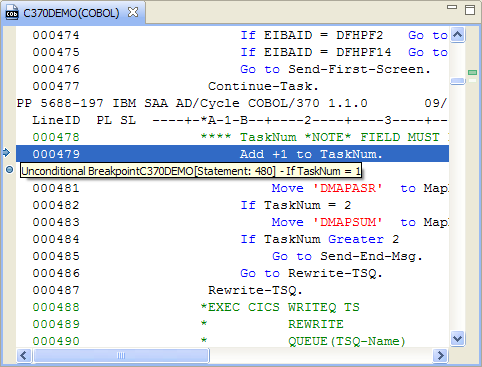
When you open or activate a program listing in the Program Listing area, the breakpoints added to that program appear as blue circles  . When the mouse hovers over a blue circle, the following details of a breakpoint are displayed:
There are six types of breakpoints.
The program stops because CA InterTest for CICS detected and prevented an error. When a program is stopped at an automatic breakpoint, you can either correct the error or go around it. You set all other breakpoints.
The program stops at the location you specify if a condition is met. Optionally, conditional breakpoints can be set to stop at any instruction if a condition is met.
The program stops at every CICS command or macro, at certain CICS commands or macros, or at calls to PL/I, DB2, or software.
The program stops after executing one or more verbs.
The program stops at the location you specify, just before the statement is executed.
The program stops at any location if the value of a specified variable has changed. This is a special type of conditional breakpoint.
Example:
In this example, execution stops just before the statement Add +1 to TaskNum is executed. A blue arrow points to that statement. This illustration displays the information when the mouse hovers over a blue circle.
|
Copyright © 2015 CA Technologies.
All rights reserved.
|
|