

When an abend occurs, identify the cause of the error and correct it before resuming the program execution. Use the Auto Data view to see the values of the variables that are associated with a statement. Use the Watch Data view to see the value of data items that you want to watch.
Example:
In this example, an Assembler program has encountered an error at the TASKNUM statement. The value of TASKNUM is displayed as an expression (%R13+189) in the Auto Data view. The left column shows the base + displacement for the name of the data item. In the columns to the right are the field's display value. Assembler programs show as Memory Expression, and hex value at that offset.
e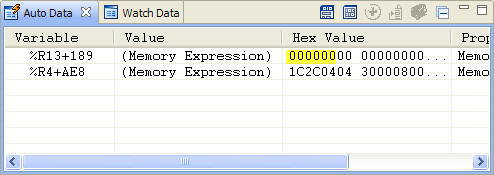
Look at the contents of TASKNUM. Confirm that the value stored in TASKNUM is not a valid packed decimal value by examining its current value in the Auto Data view; that is, its value prior to the execution of the AP statement that triggered the ASRA. Instead, it contains low‑values (binary zeros – the three highlighted bytes). Assembler does not allow you to add a packed decimal value (=P’1’) to a field initialized with low values.
|
Copyright © 2015 CA Technologies.
All rights reserved.
|
|