

The menus offer easy access to the CA InterTest for CICS LIST, CNTL, CORE, FILE, and SYMD facilities. The following figure shows how the Primary Option Menus are used to access each facility.
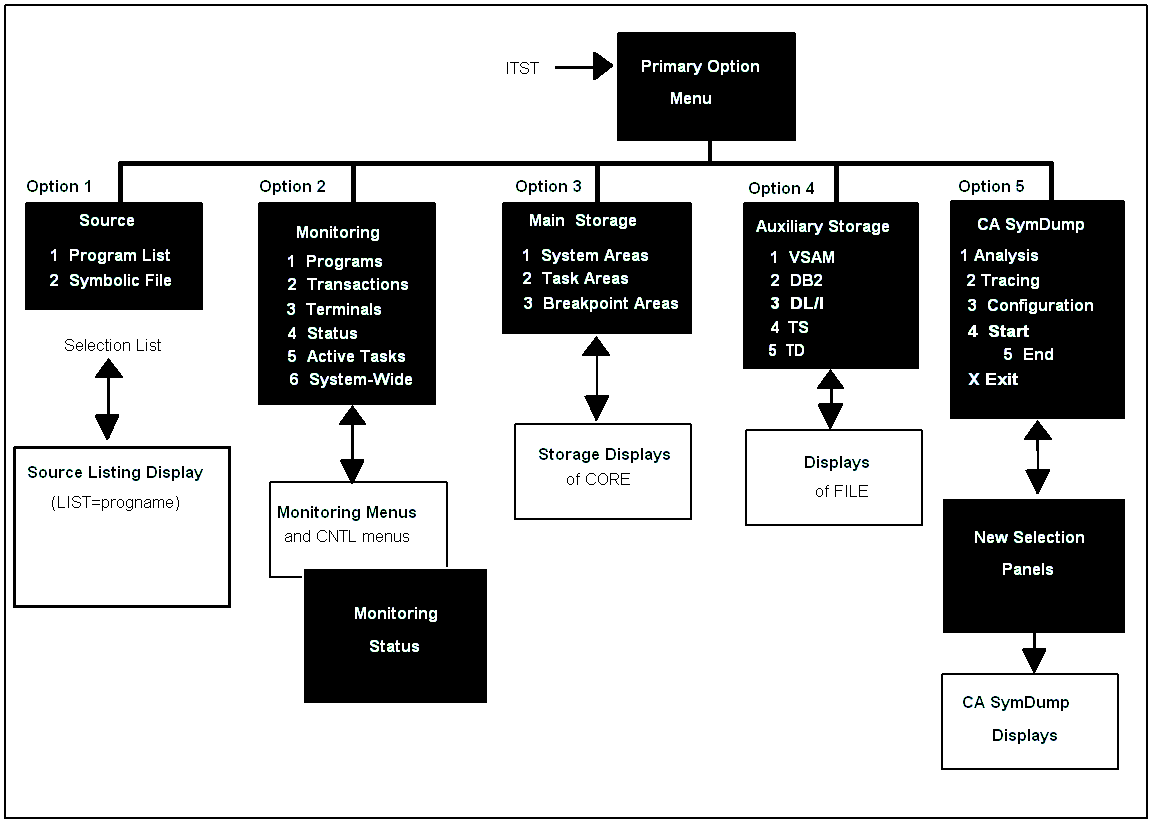
The previous graphic does not include the last four Primary Menu Options:
6 Product Help—Displays the main menu for all help topics.
7 Status/Maintenance—Status provides online displays of CA InterTest for CICS and CA SymDump for CICS product components, including the genlevel, global installation options, and what maintenance has been applied. Maintenance allows a help administrator to maintain the optional user‑help file entries of user‑defined abend codes and descriptions.
8 What's New—Displays online help topics listing the new features for this release.
X Exit—Exits menu processing. Quick exit from any menu is =X.
The Primary Option Menu is available at all times, even if you did not start the session from a menu. For example, if you started your CA InterTest for CICS session using LIST=COBDEMO, from the Source Listing Display you can still use PF6 Menu to display the Primary Option Menu; or if you used single‑line commands to set monitoring and breakpoints for your program, and then execute the program and reach a breakpoint, PF 6 Menu displays the Breakpoint Primary Option Menu and Option 1 Main Menu accesses the Primary Option Menu.
|
Copyright © 2012 CA.
All rights reserved.
|
|