Configuration Guide › CA SiteMinder Integration › Create a SiteMinder 4.X agent object
Create a SiteMinder 4.X agent object
This task enables communication between SiteMinder and CA IdentityMinder. You reference this agent during the CA IdentityMinder configuration.
Follow these steps:
- Log in to the SiteMinder Administrative UI.
- Navigate to Infrastructure, Agent, Create Agent.
- Select Create a new object of type Agent.
- Specify a name for the agent.
- Select Supports 4.x agents.
- Enter the source IP address, which is the IP address of the CA IdentityMinder server.
- Set the application pool to Classic mode.
- Click Submit.
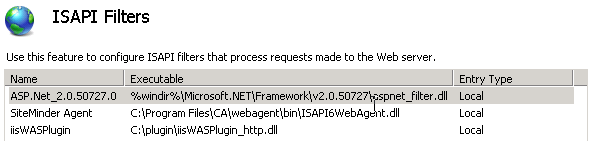
- Make sure the agent is higher in the ISAPI Filters priority list than the plug-in for the application server used by CA IdentityMinder. In the following example, the agent is higher than the WebSphere plug-in: