Administration Guide › Reporting › How to Run Snapshot Reports › Create a Snapshot Definition › Example: Creating a Snapshot Definition for a User Entitlement Data
Example: Creating a Snapshot Definition for a User Entitlement Data
The following example illustrates the process to create a snapshot definition for a user entitlement report:
- In the User Console, go to Reports, Snapshot Tasks, Manage Snapshot Definition, Create Snapshot Definition.
- Select Create a new object of type Snapshot Type.
- Enter the Snapshot definition name, description, and the number of snapshots retained.
- In the Snapshot Policy Definition Tab, click Add.
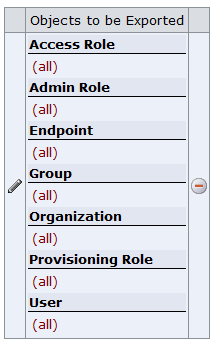
From the drop-down, select the user and select All. Similarly, add Endpoint, Provisioning Role, Admin Role, Access Role, Organization, and Group as shown in the following screen:
- In the Role Setting Tab, select all the user role checkboxes.
- In the User Attributes Tab, select the required attributes from the Available Values list and move them to the Current Values list.
- Click Submit.
|
Copyright © 2013 CA.
All rights reserved.
|
|

