

This section contains the following topics:
Communication with Other Components
Supported Databases and Directories
Where Connector Xpress Stores User Preferences
Connector Xpress is a CA Identity Manager utility for managing dynamic connectors, mapping dynamic connectors to endpoints, and establishing routing rules for endpoints. You can use it to configure dynamic connectors to allow provisioning and management of SQL databases and LDAP directories.
Connector Xpress lets you create and deploy custom connectors without extensive technical expertise.
You can also set up, edit, and remove a connector server configuration using Connector Xpress.
The primary input into Connector Xpress is the native schema of an endpoint system. For example, you can use Connector Xpress to connect to an RDBMS and retrieve the SQL schema of the database. You can then use Connector Xpress to construct mappings from those parts of the native schema that are relevant to identity management and provisioning. A mapping describes how the provisioning layer represents an element of the native schema.
Connector Xpress generates metadata that describes, to a dynamic connector, the runtime mappings to a target system.
The output of Connector Xpress is a metadata document produced when you complete your mappings. The metadata is an XML file that describes the structure of your connector to the CA IAM Connector Server.
The output describes the provisioning server classes and attributes and how they are mapped to the native schema.
The metadata is used to create dynamic endpoint types that you can manage with CA Identity Manager.
The following diagram shows the direct and indirect communications between Connector Xpress and other components in the distributed system:
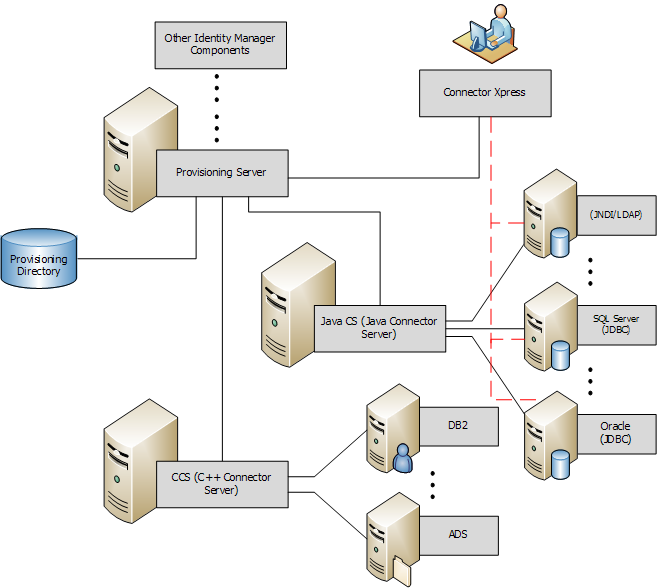
Note: The dashed red lines indicate that the direct communications between Connector Xpress and endpoints are read-only. These direct communications occur when setting up data sources.
To see the list of directories and databases that Connector Xpress supports, see the Platform Support Matrix. Look for the table named CERTIFIED CONNECTOR XPRESS ENDPOINT TYPES.
Connector Xpress caches the passwords used with each Provisioning Server only when the application is open. When the application is closed, Connector Xpress does not permanently record passwords. When Connector Xpress needs a password, and the password is not cached, or the cached password causes a failed authentication attempt, Connector Xpress prompts you to enter the password.
The Connector Xpress window contains the following three panes:
Displays an overview of the mappings you made for your endpoint. Each node and child node represents an aspect of your endpoint mapping. For example, attributes you have mapped, associations between classes, and operation bindings for your endpoint. Clicking a node displays a dialog that allows you to edit the parameters of the node.
Displays a dialog that lets you edit the parameters for the node you have selected.
Displays the endpoints and connectors of multiple Provisioning Servers.
The Mapping Tree lets you define the mappings, associations, and operation bindings for your connector. The mapping tree contains the following nodes:
Lets you create a description of your endpoint.
Lets you map a new class and view a read-only list of the classes that you have mapped and the native classes they are mapped to.
Lets you specify the JDBC database tables or the JNDI native object classes that you want map a class to.
Lets you map provisioning attributes to the JDBC database table columns or JNDI object class attributes of the endpoint.
Lets you configure extended details of the selected attribute.
Lets you arrange the attributes you have mapped into the groups and subgroups that you want to appear as tabs and pages in the CA Identity Manager User Console account screens.
Lets you specify the classes you want to create direct and indirect associations between.
Lets you specify which object classes you want to use as containers in your connector.
Lets you define arbitrary strings (flexi-strings) you want to use as metadata types in attribute mappings.
Lets you specify operation binding information and display a summary of existing operation bindings.
Lets you name the script you want to bind to the operation bindings you have mapped.
Lets you specify the parameters of the script you want to bind to the operation bindings you have mapped.
The Provisioning Servers tree (in the lower left pane) lets you manage the endpoints and connectors of multiple Provisioning Servers. The Provisioning Servers tree contains the following fields:

Refreshes the currently selected node in the Provisioning Tree.
Note: The Refresh button is only available when you select a tree node that has a changeable list of child nodes. For example, the button is not available for a particular endpoint, as this type of node always has Policies and Endpoint child nodes only. For the endpoints node of a particular endpoint, the button is available.

Displays the actions you can perform on the currently selected object in the Provisioning Tree. Clicking this button is equivalent to right-clicking the currently selected object in the Provisioning Tree.
Lets you add and configure Provisioning Server connection details. When you add a Provisioning Server, Connector Xpress maintains the details of the Provisioning Server so that you can access it each time you run Connector Xpress.
Displays each registered Provisioning Server on the network. You can use this node to edit or remove the Provisioning Server connection details.
Displays the domain configured for the Provisioning Server.
Displays a list of endpoint types. You can use this node to create an endpoint type.
Lets you do the following:
Groups endpoints of a particular endpoint type.
Displays an endpoint that you have acquired on the Provisioning Server. You can use this node to:
Displays groups of policies of a particular endpoint type.
Note: A default policy is provided for all endpoint types.
Displays a list of CS configurations.
You can use this node to:
Displays logical groupings of CA IAM Connector Server configurations. These configurations contain the DSFConfig style routing rules for managing branch DNs. You can use this node to add a new routing rules configuration object for a C++ Connector Server or CA IAM Connector Server service.
Displays the endpoint types, endpoints, and the dynamic endpoint types that the selected Connector Server manages.
Connector Xpress stores user preferences through the Java Preferences API.
On Windows, this stores data in the following registry key:
HKEY_CURRENT_USER\Software\JavaSoft\Prefs
On UNIX, this stores data in the user's home directory under the .java/.userPrefs folder.
Note: The uninstaller does not remove this data, so subsequent installs preserve user preferences.
|
Copyright © 2015 CA Technologies.
All rights reserved.
|
|