

CA Identity Manager supports metadata-based generation of role and screen definitions for the CA Identity Manager User Console.
You can create the account management screens for a specific dynamic endpoint type in the CA Identity Manager User Console. The account management screens let you manage the accounts, account templates, and endpoints on a specific endpoint type. To create the account management screens, you do the following:
These attributes appear as tabs and page sections in the account management screens. Connector Xpress saves the groupings you make in the metadata.
The presentation metadata defines:
Importing the field, screen, tab, task, and role definitions makes the account management tasks available in the User Console.
The Role Definition Generator is a stand-alone utility that generates the files needed by the CA Identity Manager Server to provide account management for a specific endpoint type through the User Console.
The Role Definition Generator is installed with the CA Identity Manager Server in the following directories:
Valid on Windows and UNIX
The Role Definition Generator command parses the endpoint type metadata generated from Connector Xpress and generates endpoint type.jar. This JAR file contains the JIAM mapping files, framework, managed object definition files, resource bundle file and task role and screen definition file.
This command has the following format on Windows:
RoleDefGenerator.bat [-c jar_path] [d domain] -e fqn -h hostname -l -m filename -o directory -n -p port -u username -s -y password_file.txt ] [endpoint_type ...]
This command has the following format on UNIX:
RoleDefGenerator.sh [-c jar_path] [d domain] -e fqn -h hostname -l -m filename -o directory -n -p port -u username -s -y password_file.txt ] [endpoint_type ...]
Specifies that JAR is added to the classpath when using a JIAM extension JAR file.
Note: Optional, but if used, must be specified first.
Specifies the CA Identity Manager domain. If not specified, the role definition generator defaults to the CA Identity Manager domain.
Defines the fully qualified name of the JIAM option descriptor class that matches the metadata being used. Must be used in conjunction with the -m option. The JIAM extension jar that contains this endpoint type must be available in the classpath.
Defines the host name of Provisioning Server.
Specifies that the Role Definition Generator lists endpoint types, but does not generate role definitions.
Specifies that the metadata specified in this file is used to generate role definitions.
Defines the output directory.
Default: '.' that is, the current working directory.
If specified, TLS is not used. TLS communication is enabled by default.
Specifies the Provisioning Server port number. If not specified, then 20390 is used, or 20389 is used if –n is specified.
Defines the Provisioning Server admin user name.
Run in Standalone CA IAM Connector Server mode.
Specifies the file that contains the Provisioning Server admin user password. If not specified, the utility prompts you for the password. The password file is in UTF-8 format. The first line of the file is used as the password.
Defines the name of the endpoint type (long form).
Example: List all endpoint types on a Provisioning Server
This example lists all endpoint types on a Provisioning Server:
RoleDefGenerator.bat -d EXAMPLEDOMAIN -h im.example.com -u adminusername -l
Example: Generate role definitions for a dynamic endpoint type
This example generates role definitions for YourDynamicEndpointType.
RoleDefGenerator.bat -d EXAMPLEDOMAIN -h im.example.com -u adminusername YourDynamicEndpointType
This example shows you how to create the presentation metadata that defines the tabs and page sections in the account management screens in the User Console for a simple JNDI connector. This example creates account management screens for a dynamic endpoint type named MyJNDIEndpointType.
To generate account management screens for the dynamic endpoint type MyJNDIEndpointType, do the following:
CA Identity Manager Server requires this file to provide account management for MyJNDIEndpointType.
The following example shows you how to group the attributes you have mapped for MyJNDIEndpointType into the logical groups and subgroups you want to appear as tabs and page sections in the account management screens in the User Console.
This example assumes that you have done the following tasks:
Example: Create the presentation metadata
To group the attributes you have mapped into the logical groups and subgroups you want to appear as tabs and page sections in the account management screens in the User Console, use Connector Xpress to create the presentation metadata.
Follow these steps:
The Account Screens dialog appears.
The Login page section appears.
The Name page section appears.
The Membership page section appears.
Use the Role Definition Generator to generate the field, screen, tab, task, and role definitions from the presentation metadata you created in Connector Xpress and the files required by the CA Identity Manager Server to provide account management for a specific endpoint type through the User Console.
Example: Generate role, task, and screen definition files
To convert the presentation metadata to the files required by CA Identity Manager to provide account management screens for MyJNDIEndpointType, use the Role Definition Generator.
Valid on Windows and UNIX
Follow these steps:
The command generates the MyJNDIEndpointType.jar file.
The role, task, and screen definitions generated from the metadata include a basic Manager role and an Auditor (read-only) role the endpoint type you specified.
The following example shows you how to deploy CA Identity Manager Server Configuration Files to the CA Identity Manager Server.
Example: Deploy CA Identity Manager server configuration files
To provide account management for MyJNDIEndpointType, deploy the MyJNDIEndpointType.jar file to the CA Identity Manager Server.
Valid on Windows and UNIX
Follow these steps:
Note: For WebSphere, copy the JAR file to:
WebSphere_home/AppServer/profiles/Profile_Name/config/cells/Cell_name/applications/iam_im.ear/user_console.war/WEB-INF
The following example shows you how to import the role and task settings generated by the Role Definition Generator into CA Identity Manager.
To provide account management for MyJNDIEndpointType, import the role and task settings generated by the Role Definition Generator into CA Identity Manager.
Follow these steps:
The status is displayed in the Role Configuration Output window.
The account management screens for MyJNDIEndpointType are available in the User Console when you perform account management tasks such as creating and modifying accounts on an endpoint.
This grants the users access to the Account tasks and Accounts tab.
Members of the System Manager admin role see the new Accounts tab in the Modify User's Accounts and View User's Account admin tasks automatically.
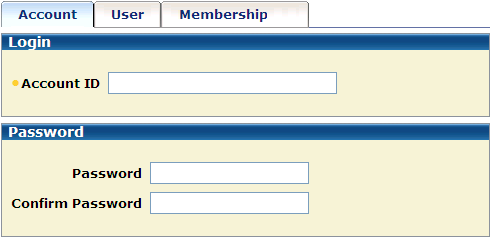
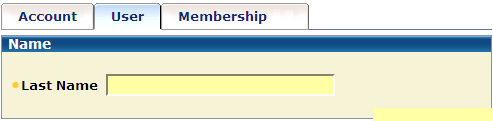
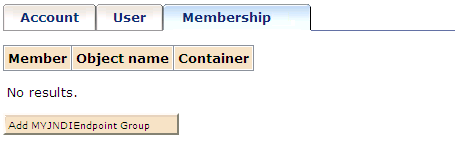
Example: Generated account screens
This example shows you how the account management screens for the account management task look after you import the role and task definitions into CA Identity Manager.
You can undeploy the role definitions for a given endpoint type from a CA Identity Manager environment where you previously imported role definitions
Follow these steps:
The endpoint type is unregistered from the CA Identity Manager server and no longer appears in the CA Identity Manager User Console. You can no longer manage accounts or account templates for that endpoint type in the CA Identity Manager User Console. Removing the endpoint-type-specific .jar has no effect on objects which are on the Provisioning Server side, for example, account templates, endpoints and such for the endpoint type.
|
Copyright © 2015 CA Technologies.
All rights reserved.
|
|