Previous Topic: Upgrade CA Identity GovernanceNext Topic: CA Identity Governance Server Prerequisites


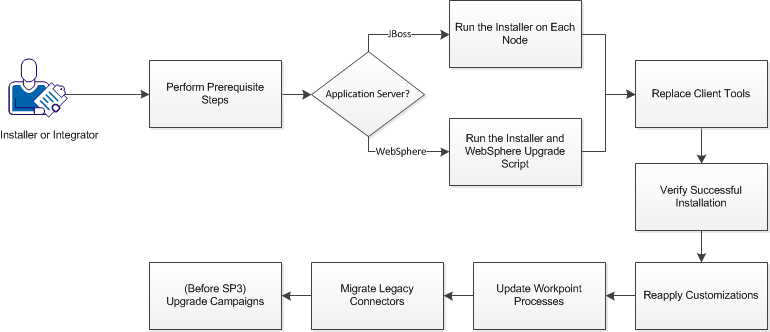
How to Upgrade CA Identity Governance

This section describes how to upgrade CA Identity Governance to the current release.

Upgrade Process

Follow these steps:

  1. Verify CA Identity Governance Server Prerequisites.
  2. Upgrade your application server:
  3. Install Client Tools.
  4. Verify Successful Installation.
  5. Reapply any customizations and reverify installation.
  6. Update Workpoint Processes.
  7. Migrate Connectors.
  8. Upgrade Campaigns (for upgrades from r12.5 SP2 and earlier only).