

CA Identity Governance Client Tools Guide › Role Discovery › Identify Almost Perfect Matches › Propose Closely Matching Roles › Based on User
Based on User
To find closely matching roles based on a user
- Select the user in the Users Panel.
- Go to Discovery, Identify Almost Perfect Matches on the menu bar and select Closely Matching Roles, or right-click on the users record in the Users Panel and select Almost Matching Roles from the right-click controls menu.
- The Almost Matching Roles window opens .
At this point, it is necessary to determine the extent of matching resources; CA Identity Governance will display default values. The following variables can be set when searching for closely matching users:
- Minimum Number of Matching Resources
-
An absolute number of resources that match that of the role to match.
- Minimum Percent of Matching Resources
-
On a scale of 1 to 100 percent. The result is determined by an internal algorithm.
- After filling in the values, click OK to generate the results.
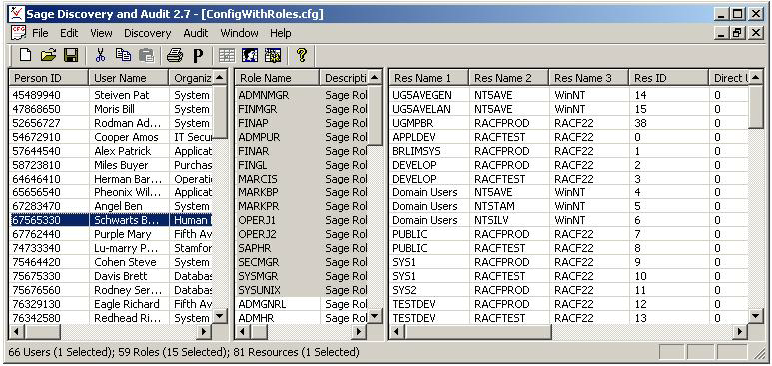
The following is a typical results window. User on which results are based are highlighted. Closely matching roles are in gray.
Copyright © 2014 CA.
All rights reserved.
|
|