

You can use CA SiteMinder® to support the Single-Sign-On (SSO) function for CA Identity Governance Portal users.
Users log in to a CA SiteMinder® environment and are authenticated once. Users then have access to additional systems without being prompted to log in again at each site. CA SiteMinder® maintains user credentials and a list of active sessions.
To implement SSO in the CA Identity Governance server environment, you must have the following CA SiteMinder® components:
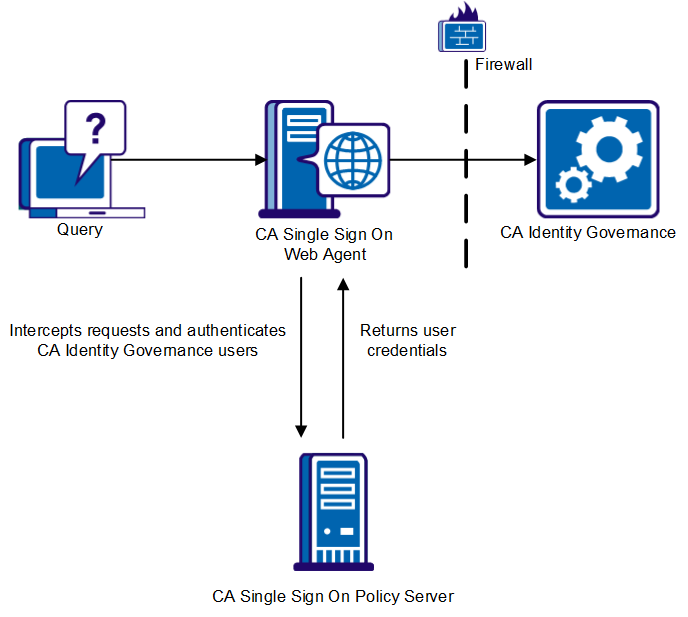
When you implement SSO, a CA SiteMinder® Web Agent intercepts user requests submitted to the CA Identity Governance server, and queries the CA SiteMinder® Policy Server to authenticate the user. The Policy Server returns user credentials that enable the CA Identity Governance server to identify the user in the local portal users file.
The CA Identity Governance and CA SiteMinder® servers are typically located behind enterprise firewalls, and the HTTP server with the CA SiteMinder® Web Agent is exposed to the public network.
The following diagram illustrates the CA SiteMinder® and SSO interaction:
Note: For more information about CA SiteMinder® implementation and configuration, see the CA SiteMinder® Policy Server Configuration Guide, the CA SiteMinder® Web Agent Configuration Guide, and other relevant portions of the CA SiteMinder® documentation.
The following diagram illustrates how to implement SSO with CA SiteMinder®:
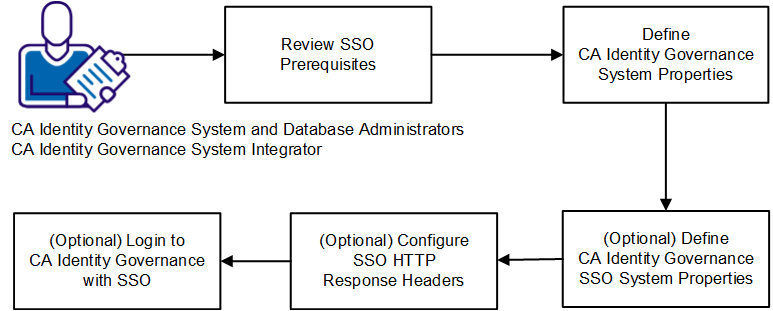
Follow these steps to implement SSO with CA SiteMinder®:
|
Copyright © 2014 CA.
All rights reserved.
|
|