

The following topics illustrate the JBoss cluster architecture supported by CA Identity Manager 12.6.4:
In configuring JBoss clustering, you create a master node and it is usually the node that starts first in the cluster. As other nodes start, they receive deployment files from the master node. If the master node fails, another node becomes the new master node.
The following JBoss 5 figure shows the relationship between the nodes and cluster members. Each node contains one cluster member. Each member of the cluster has a unique Server Peer ID. The master node would be cluster member 1, assuming it was created first.
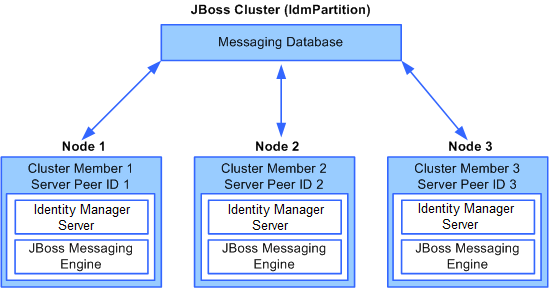
In this figure, the messaging database is a central store for cluster members to share messages and each node contains three components:
Provides the core functionality of the product.
Provides messaging functionality for members of the cluster using JMS.
On JBoss Enterprise Application Platform (EAP) 6.1, CA Identity Manager supports clusters that use either the unicast or multicast form of communication between nodes. In either type of cluster, you create a master node and it is usually the node that starts first in the cluster. As other nodes start, they receive deployment files from the master node. If the master node fails, another node becomes the new master node.
For example, consider the situation where you have a cluster of two nodes. The following figure shows the relationship between the nodes and cluster members. Each node contains one cluster member. Each member of the cluster has a unique Server Peer ID. The master node would be cluster member 1, assuming it was created first.
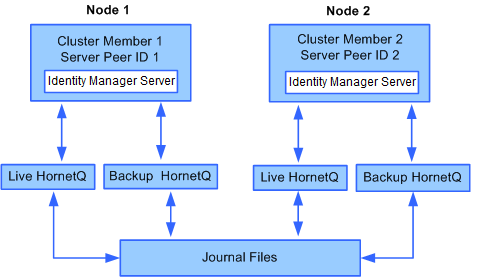
In this figure, the following components exist:
Provides the core functionality of the product.
Provides messaging functionality for members of the cluster. On each node, you configure two HornetQ instances, a live instance and a backup.
Persists HornetQ messages using journal files without using a database. You configure each HornetQ instance to store journal files. In this example, all nodes share a set of journal files, which are on a Storage Area Network (SAN) Server. This scenario is referred to as a Shared Store.
In you choose Replication instead of a Shared Store during installation, journal files are stored on each node.
|
Copyright © 2014 CA.
All rights reserved.
|
|