

You integrate the CA Identity Governance Discovery and Audit tool with Oracle RAC databases to import and modify data, analyze, construct and administer the role hierarchy.
Follow these steps:
The CA Identity Governance Client Tools installer, CA-RCM-RN-Client-Tools-x86.zip, is located in the folder where you downloaded the installation package files when you installed CA Identity Governance.
Note: RN is the current release number for the product.
The CA Role and Compliance Manager - Discover and Audit window appears.
The Discovery and Audit Settings window appears.
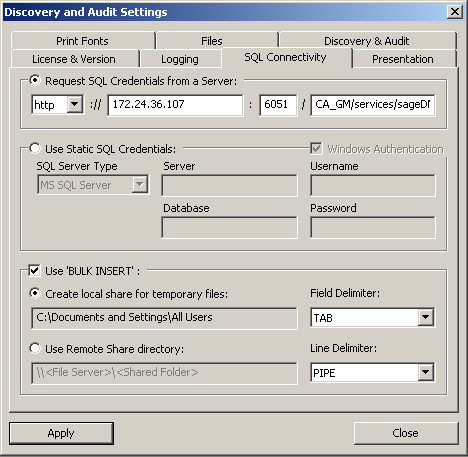
This option connects the SQL database through the CA Identity Governance server.
The following graphic displays the Request SQL Credentials from a Server option that is selected with an example server host IP address and port number displayed:
The Enter Server Credentials window appears.
The CA Identity Governance Discovery and Audit tool is integrated to connect with Oracle RAC databases to manage data.
|
Copyright © 2014 CA.
All rights reserved.
|
|