

In a single node installation, the CA Identity Manager Server is installed on one application server node. Also, one copy of each provisioning component is installed, but components can be on different systems. The following figure is an example of a single node CA Identity Manager installation with a Provisioning Server on the same system and a Provisioning Directory on another system:
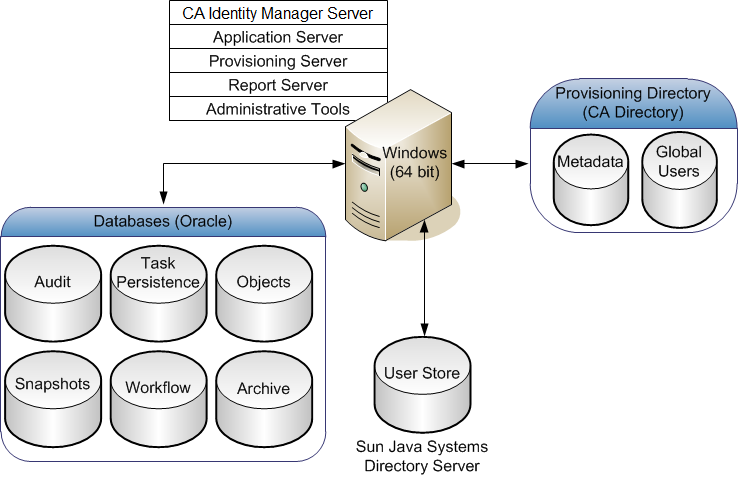
This example also illustrates choices for platforms. In this case:
These platforms are only examples. You can select other platforms instead.
Executes tasks within CA Identity Manager. The J2EE CA Identity Manager application includes the Management Console (for configuring environments), and the User Console (for managing an environment).
Provides tools and samples for configuring and using CA Identity Manager. The tools include Connector Xpress, the Java Connector Server SDK, configuration files, scripts, utilities, and JAR files that you use to compile custom objects with CA Identity Manager APIs and API samples. The Provisioning Manager and WorkPoint Designer are also included with the Administrative Tools.
The default installation location for most Administrative Tools follows:
However, the default location for Provisioning Manager, which is only installed on Windows, follows:
C:\Program Files\CA\Identity Manager\Provisioning Manager
Note: The Tools\db directory also includes a document that describes the database schema.
Uses CA Business Intelligence. You use this server to include data from the Snapshot Database, which contains information from the CA Identity Manager Object Store and the CA Identity Manager user store. An example of a Snapshot Report is the User Profile report. You can also create reports with a disabled snapshot applied, which include data from other data sources, such as the Audit Database.
Store data for CA Identity Manager. The databases store information for auditing, task persistence, snapshots (reporting), workflow, and CA Identity Manager objects. Each database must be a relational database.
Note: For a complete list of supported relational databases, see the CA Identity Manager support matrix on the CA Support Site.
Contains users and their information. This store can be a pre-existing user store already in use by the company. This user store can be LDAP or a relational database.
Note: For more information about setting up a user store for CA Identity Manager, see the Configuration Guide.
Manages accounts on endpoint systems. On the same system or another system, you can also install Connector Servers, which manage Java or C++ based connectors to endpoints.
Specifies the Provisioning Directory schema to CA Directory. This schema sets up the Directory System Agents (DSAs) within CA Directory. The CA Identity Manager user store can also be the Provisioning Directory.
Manages the Provisioning Server through a graphical interface. This tool is used for administrative tasks such as synchronizing accounts with account templates. The Provisioning Manager is installed as part of the CA Identity Manager Administrative Tools or can be installed separately from those tools.
Note: This application runs on Windows only.
|
Copyright © 2014 CA.
All rights reserved.
|
|