

Three types of users are involved in setting up mobile apps. The following graphic illustrates these user types and the tasks they perform.
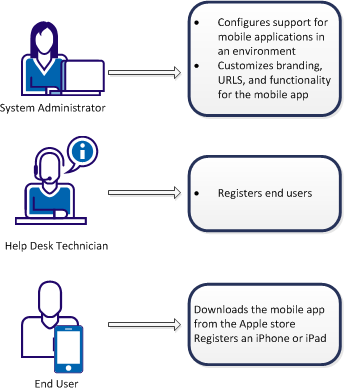
To enable an end user to use the mobile app with CA IdentityMinder, the following activities occur:
The configuration involves the following activities:
The system administrator also configures the branding, URLs, and functionality that mobile users can access.
The registration process triggers an activation code for each end user, and automatically sends an email with the code and registration instructions to the end user.
The end user can then use the mobile app to access CA IdentityMinder functionality.
Note: If the option Password Must Change is selected during user creation, mobile app users cannot complete activation.
The Mobile Application retrieves its configuration from the CA IdentityMinder Server Configuration APIs. When the Mobile Application is first installed and has no configuration downloaded, it will prompt the User for user name and password and use these credentials to download the defined configuration from the link provided in the User Registration email.
After the initial configuration download, each time the application is started is compares its configuration version with the latest version available on the CA IdentityMinder Server. The configuration version check API is used to detect if a later version is available.
Each User desiring Mobile Application access must request access within CA IdentityMinder. If approved for access the User is updated with an Activation Code that indicates access has been granted. The Mobile App Configuration Member policy and the underlying Web Services Member policy should meet whatever criteria defined for Mobile Users requesting access. At a minimum the %ACTCODE% value of ‘Registered’ or a value greater than ‘0’ needs to be defined.
If a User’s mobile access is removed the CA IdentityMinder Server will reset the Activation attributes and prevent user access to the Mobile Application.
|
Copyright © 2014 CA.
All rights reserved.
|
|