

CA GovernanceMinder Programming Guide › Transforming Data › Create a Transformation › Configure the Transformation Settings
Configure the Transformation Settings
For your transformation to connect to CA GovernanceMinder, configure the transformation settings in PDI.
Follow these steps:
- Launch PDI, as follows:
- Windows: Go to Start, Programs, CA, Role & Compliance Manager, Server, Data Integration Tool (PDI).
- Linux: Click the Data Integration Tool (PDI) icon in your home directory.
Note: PDI is located in the following directory:
CA/RCM/Server/data-integration
- Go to File, Open, and browse to the following directory:
data-integration/samples/RCM
- Open the template.ktr file and save it underanother name relevant to the transformation you want to create.
- Press CTRL-T.
The Transformation properties windows opens.
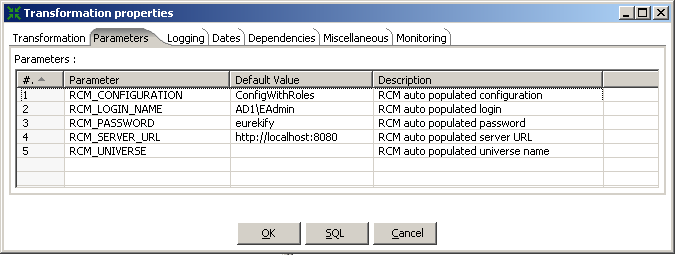
- Click the Parameters tab, and enter the following CA GovernanceMinder information:
- RCM_CONFIGURATION
- RCM_LOGIN_NAME
- RCM_PASSWORD
- RCM_SERVER_URL
- RCM_UNIVERSE
The following image is an example of the Parameters field with example server information:
- Click OK.
You have started PDI and configured the CA GovernanceMinder settings.
Now that PDI is configured, you can define the steps in your transformation.
Copyright © 2014 CA.
All rights reserved.
|
|