

CA Identity Manager includes a status page that you can use to verify the following status:
Follow these steps:
C:\Program Files\CA\Identity Manager\IAM Suite\Identity Manager\IAM Suite\Identity Manager\tools\samples\Admin\user_console.war
C:\Program Files\CA\Identity Manager\IAM Suite\Identity Manager/iam_im.ear/user_console.war
http://hostname/iam/im/status.jsp
Determines the fully qualified domain name of the server where CA Identity Manager is installed, for example, myserver.mycompany.com.
If the CA Identity Manager Environment starts correctly and all of the connections are running successfully, the status page resembles the following illustration:
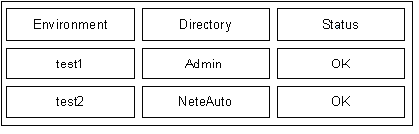
The status page also indicates whether the environment is FIPS 140-2 compliant.
|
Copyright © 2013 CA.
All rights reserved.
|
|