

The following is sample report #1:
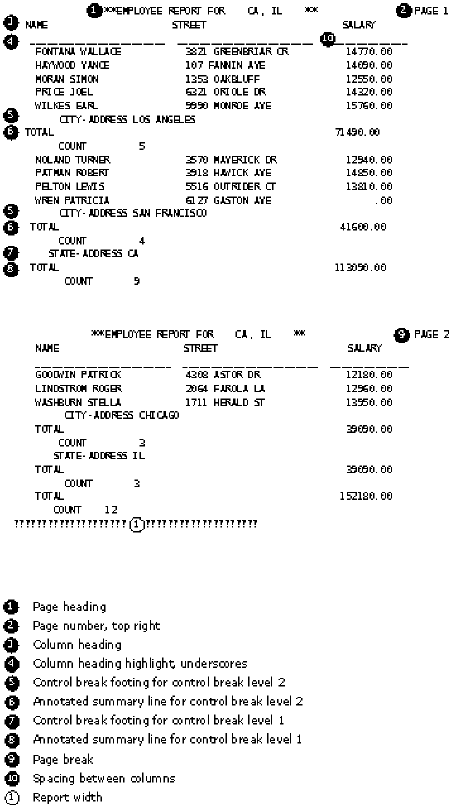
The following screens show the fill‑ins completed for sample report #1. This screen shows the completed report parameters fill-in for sample report #1.
 =>
‑‑‑‑‑‑‑‑‑‑‑‑‑‑‑‑‑‑‑‑‑‑‑‑‑‑‑‑‑‑‑‑ Partially shown
 IDEAL   : RPT PARAMETERS        RPT EMPRPT  (001) TEST            SYS: DOC  DISP

 Lines per page on printout           060  (0 thru 250)
 Report width                         080  (40 thru 230)
Spacing between lines                1    (1 thru 3)
Spacing between columns              02   (0 thru 66 OR A=Automatic)
Spacing after page and column hdgs   1    (0 thru 9)
Summaries only                       N    (Y=Yes,N=No)
 Column headings desired              Y    (Y=Yes,N=No)
 Column headings indication           U    (U=Underscore,N=None,D=Dashes)
Control break heading                N    (Y=Yes,N=No)
 Control break footing                Y    (Y=Yes,N=No)
 Automatic page footing summaries     N    (Y=Yes,N=No)
 Group continuation at top of page    Y    (Y=Yes,N=No)
 Annotated count in break footings    Y    (Y=Yes,N=No)
 Report final summary title           N    (Y=Yes,N=No)
   Spacing before summary             2    (1 thru 9 = Lines,P=New Page)
   Title    __________________________________________

 Date
   Position           NO   (NO=None, BR=Bot.Right, BL=Bot.Left, BC=Bot.Ctr.,
                            TR=Top Right, TL=Top Left, TC=Top Center)
   Format             MM/DD/YY

 Page Numbers
   Position           TR
   Format             P    (D=Digits Only, H=With Hyphens, P= Page       nnn)

 Page Heading
   Heading            __________________________________________
   Position           L    (C=Center, L=Left Justify, R=Right Justify)
This screen shows the completed report detail fill-in for sample report #1.
 =>
 ‑‑‑‑‑‑‑‑‑‑‑‑‑‑‑‑‑‑‑‑‑‑‑‑‑‑‑‑‑‑‑‑‑‑‑‑‑‑‑‑‑‑‑‑‑‑‑‑‑‑‑‑‑‑‑‑‑‑‑‑‑‑‑‑‑‑‑‑‑‑‑‑‑‑‑‑‑‑‑‑‑
 IDEAL   : RPT DETAIL DEFN.      RPT EMPRPT  (001) TEST            SYS: DOC  DISP

         Field Name, Literal,      Sort   Break  Function Column
         Function, or               L A   L S I  T M M A  H W
 Command Arithmetic Expression      V /   V K N  O A I V  D ID Tab Edit Pattern
                                    L D   L P D  T X N G  G TH
 ‑‑‑‑‑‑  ‑‑‑‑‑‑‑‑‑‑‑‑‑‑‑‑‑‑‑‑‑‑‑‑‑  ‑ ‑   ‑ ‑ ‑  ‑ ‑ ‑ ‑  ‑ ‑‑ ‑‑‑ ‑‑‑‑‑‑‑‑‑‑‑‑‑
 ======  =========== T O P =======  = =   = = =  = = = =  = == === =============
 000400  EMPLOYEE.NAME              _ _   _ _ _  _ _ _ _  U __ ___ _____________
 000500  STREET‑ADDRESS             _ _   _ _ _  _ _ _ _  U __ ___ _____________
 000600  CITY‑ADDRESS               _ _   2 2 N  _ _ _ _  _ __ ___ _____________
 000700  STATE‑ADDRESS              _ _   1 P N  _ _ _ _  _ __ ___ _____________
 000800  SALARY                     _ _   _ _ _  S _ _ _  U __ ___ _____________
 ======  ========= B O T T O M ===  = =   = = =  = = = =  = == === =============
This screen shows the completed column headings fill-in for sample report #1.
 =>
 ‑‑‑‑‑‑‑‑‑‑‑‑‑‑‑‑‑‑‑‑‑‑‑‑‑‑‑‑‑‑‑‑‑‑‑‑‑‑‑‑‑‑‑‑‑‑‑‑‑‑‑‑‑‑‑‑‑‑‑‑‑‑‑‑‑‑‑‑‑‑‑‑‑‑‑‑‑‑‑‑‑
 IDEAL   : RPT COLUMN HEADINGS   RPT EMPRPT  (001) TEST          SYS: DOC  DISP

         Field Name, Literal,      Column
         Function, or              H W
 Command Arithmetic Expression     D ID Tab Headings
                                   G TH
 ‑‑‑‑‑‑  ‑‑‑‑‑‑‑‑‑‑‑‑‑‑‑‑‑‑‑‑‑‑‑‑‑ ‑ ‑‑ ‑‑‑ ‑‑‑‑‑‑‑‑‑‑‑‑‑‑‑‑‑‑‑‑‑‑‑‑‑‑‑‑‑‑‑‑‑‑‑‑
 ======  =========== T O P ======= = == === ====================================
 000400  EMPLOYEE.NAME............ U __ ___ NAME________________________________
 000500  STREET‑ADDRESS........... U __ ___ STREET______________________________
 000600  CITY‑ADDRESS............. _ __ ___ ____________________________________
 000700  STATE‑ADDRESS............ _ __ ___ ____________________________________
 000800  SALARY................... U __ ___ SALARY______________________________
 ______  ......................... _ __ ___ ____________________________________
 ======  ========= B O T T O M === = == === ====================================
|
Copyright © 2015 CA Technologies.
All rights reserved.
|
|