

Creating Dataviews for CA Datacom/DB Native Command Access › Defining CA Datacom/DB Native Dataviews › Defining Elements
Defining Elements
The definition of elements is determined by the needs of various applications for the data in the table. An element is the logical unit of data transferred by the CA Datacom/DB software.
In CA Datacom/DB, you can define a dataview as any ordered collection of elements, with an element being any collection of fields in a record. This can include the entire record or just one field in the record. An element must be defined as consisting of fields that are contiguous.
The elements related to an CA Datacom/DB native dataview cannot contain overlapping columns. Otherwise, an error occurs when the dataview is cataloged.
CA Ideal, however, imposes additional restrictions that limit the elements that can be related to a given dataview (for CA Ideal use) and how those elements can be defined.
The following restrictions apply for dataviews and their related elements that CA Ideal accesses:
- An element related to a CA Ideal dataview must be explicitly defined as a collection of contiguous fields. In particular, when performing the DEFINE ELEMENT or the MODIFY ELEMENT function in DD, once the starting and ending fields are selected, all intervening fields must be explicitly included in the element. If fields are added to the table (when it is in TEST status), the additions are not automatically reflected in the table's related elements. The DA must also execute DEFINE ELEMENT or the MODIFY ELEMENT maintenance and explicitly include the new fields for CA Ideal if they are in the range of an existing element that CA Ideal uses.
- If a compound (group) field is included in an element, all of its subordinate fields must also be explicitly included in the element. If a field is redefined, not all redefinitions need to be explicitly included. However, the redefined field must be explicitly included if any of the redefining fields are included.
- Each dataview must be comprised of elements from a single version of the same record (and, therefore, the same table). However, you can nest the FOR statement in the Procedure Definition Language (PDL) to dynamically join two or more dataviews together.
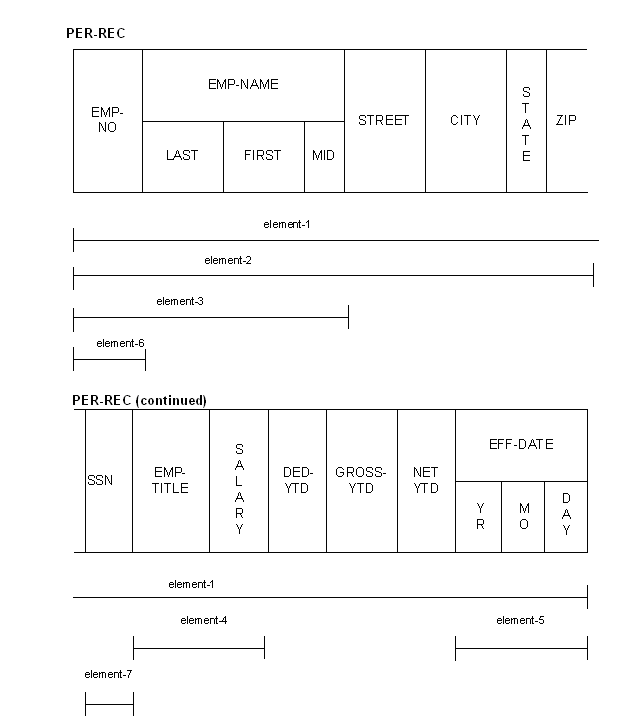
The following graphic illustrates the definition of elements for a sample record, PER‑REC, which could be defined in the dictionary facility.
Copyright © 2015 CA Technologies.
All rights reserved.
|
|