

This section describes the data administration functions of the CA Ideal user and assumes some familiarity with the Datadictionary. It explains how to establish and maintain modeled dataview definitions for CA Datacom/DB tables for CA Ideal use. For more information about explanation of these terms and use, see the CA Datacom/DB documentation.
Because dataview definitions are stored in Datadictionary, your database administrator should establish and maintain them using Datadictionary. Step by step instructions on defining a dataview using Datadictionary are provided in the section titled Defining Dataviews with Datadictionary in this chapter. However, to be sure you are creating a valid dataview for CA Ideal, you should familiarize yourself with the rules CA Ideal enforces when cataloging a dataview (See the Cataloging a Dataview section in "Introduction" chapter) before defining the dataview in the dictionary.
Access Datadictionary Online by selecting option 3 on the Administration Maintenance Menu or by issuing the CA Ideal command:
DDOL
At any time during DDOL use, the Data Administrator can return to the CA Ideal Main Menu by issuing the DDOL command:
IDEAL
The data administration functions of a Data Administrator include:
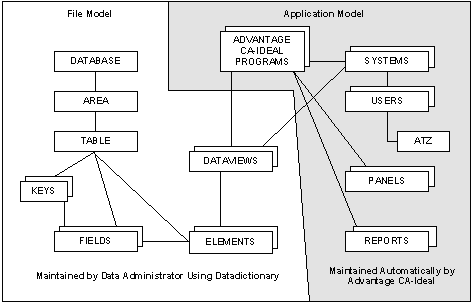
The following graphic illustrates the entity types and relationships in CA Datacom/DB and their relationship to CA Ideal. In this graphic, the unshaded area represents the file model, and the shaded area represents the application model.
|
Copyright © 2015 CA Technologies.
All rights reserved.
|
|