

You can associate a plan name directly with one or more transaction-IDs in the RCT, using the DB2TRAN and DB2ENTRY resources. To run using that plan, you must run under a transaction-ID associated with the plan. To select the plan in CA Ideal, you must assign a CA Ideal account-ID that is the same as the CICS transaction-ID and change transactions. It is also necessary to inform CA Ideal which plan to use through the SET RUN PLAN command.
You can assign the CA Ideal account-ID in any of the following ways:
SET ENV ACCOUNT-ID PAY
SET RUN PLAN PAYPLAN
SET RUN SQL STATIC
RUN COM-DUE
In this example, you must define transaction-ID PAY to CICS, using the plan name PAYPLAN. Changing to transaction-ID PAY does not take place until a TRANSMIT is executed in the COM-DUE program. If any SQL statements in this program are to be static and they are executed before the first transmit, they must be part of a plan associated with the previous transaction-ID.
For example, if you sign on under transaction-ID EMP using the sample member, the SQL statements in program COM-DUE executed before the TRANSMIT must be part of the plan for EMP. Thus, both transaction-IDs, EMP and PAY, must be defined as using the same plan.
An entry can associate multiple transaction-IDs with the one plan or you can have multiple entries each specifying a transaction-ID with its own plan. But you cannot associate the same transaction-ID to different plans.
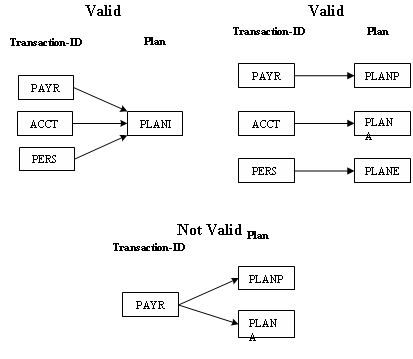
For details on RDO for DB2 requirements, see the appropriate DB2 administration documentation.
|
Copyright © 2015 CA Technologies.
All rights reserved.
|
|