

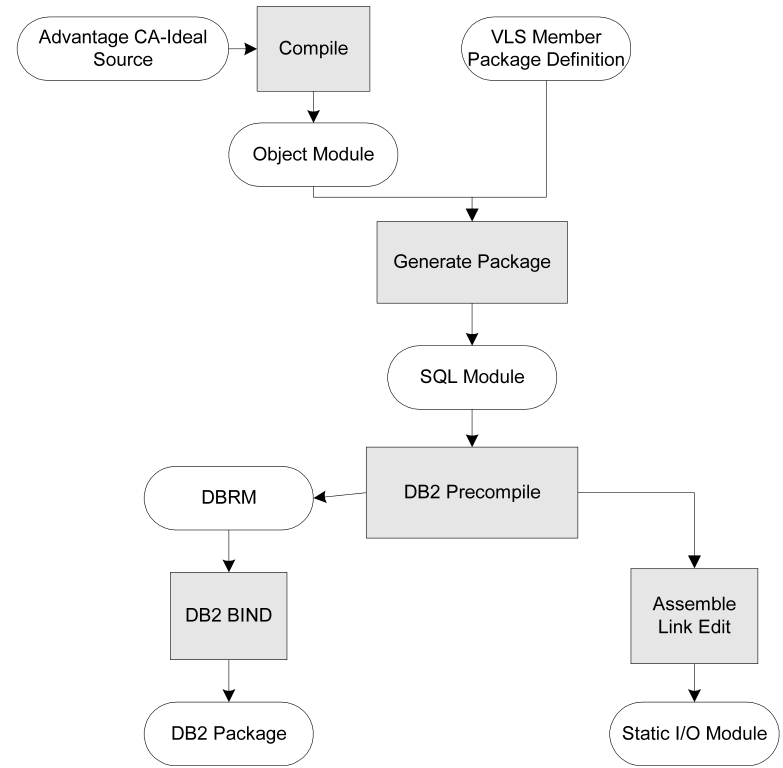
The package definition generates the package and prepares applications for inclusion in a plan. When the plan is generated, the application is ready for execution in static mode. If you recompile a program and want it to run in static mode, you must regenerate the package, but you do not need to regenerate the plan. The package preparation process is illustrated in the following diagram:
Note: When an application with static SQL is executed, the application or a program in the application runs in dynamic mode if dynamic SQL was allowed on the plan parameters fill-in. One of the following is true:
If you regenerate a package while CICS is active, use the REFRESH PACKAGE command to make a new copy of the CA Ideal static I/O module available to CICS.
You can transport DB2 applications and package definitions from the development site to the production site using the CA Ideal transport utilities (see the Working in the Environment Guide).
Issue the GENERATE PACKAGE command in batch, as shown in the following sample jobstream. The JCL needed for package generation is in the procedure IDPLAN, which you can use for both plan and package generation.
//name EXEC IDPLAN
//SYSIN DD *
PERSON ...
.
.
.
GENERATE PACKAGE AP3
OFF
/*
//
For more information about syntax of these commands, see the Command Reference Guide.
The IDPLAN procedure performs the following steps:
1. Generation of CA Ideal static I/O module
2. DB2 precompile
3. Assembly
4. Link-edit
5. DB2 BIND
Note: If you specify COPY in the package parameter fill-in, the static I/O module for the original package is relinked with the name of the new package. Because the original static I/O module was already precompiled and assembled, steps 1 through 3 are not performed before the link edit, but the BIND is still performed as the last step.
|
Copyright © 2015 CA Technologies.
All rights reserved.
|
|