

La section Matériel contient les entrées Inventaire général et Autre inventaire. La section Inventaire général peut uniquement contenir les groupes d'inventaire et les attributs qui ont été collectés par les agents CA ITCM. Pour ajouter des attributs et groupes définis par l'utilisateur, vous devez les créer en dehors de la balise de groupe GeneralInventory. Dans l'explorateur DSM, les attributs et groupes définis par l'utilisateur apparaissent sous Inventaire, dans le dossier Supplémentaire.
La section Matériel comporte les balises suivantes :
Définit le nom du groupe dans lequel les éléments d'inventaire sont créés.
Définit le nom, le type et le sous-type de l'élément d'inventaire.
Exemple : section Matériel (attribut et valeur)
Le code ci-après est un exemple de section Matériel :
<hardware>
<group name="GeneralInventory">
<group name="System">
<attribute name="Total Memory" type="int64" subtype="byte">2147483648</attribute>
<attribute name="Model" type="string">OptiPlex GX270</attribute>
<attribute name="Type" type="string">Desktop</attribute>
<attribute name="No of Processors" type="int32" subtype="normal">1</attribute>
<attribute name="No of COM ports" type="int32" subtype="normal">2</attribute>
<attribute name="No of Printer ports" type="int32" subtype="normal">1</attribute>
<attribute name="No of USB ports" type="int32" subtype="normal">2</attribute>
<attribute name="No of Video ports" type="int32" subtype="normal">1</attribute>
<attribute name="Vendor" type="string">Dell Computer Corporation</attribute>
<attribute name="Serial Number" type="string">50ZQ21J</attribute>
<attribute name="Asset Tag" type="string">N/A</attribute>
<attribute name="System ID" type="string">44454C4C-3000-105A-8051-B5C04F32314A</attribute>
</group>
</group>
</hardware>
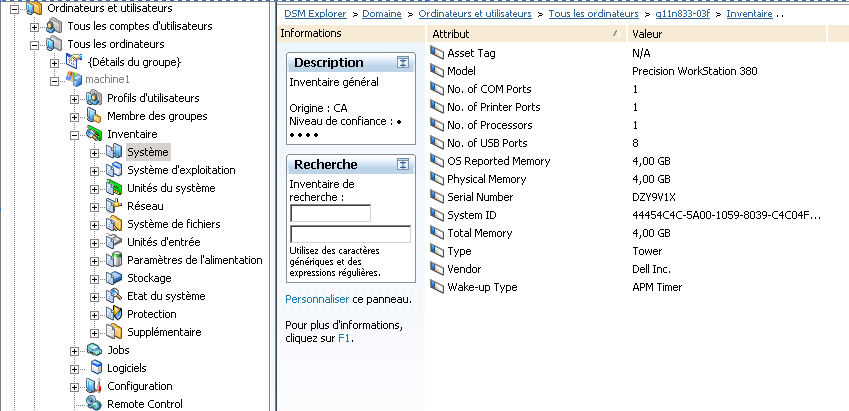
Voici comment le code ci-dessus apparaît au niveau de l'interface graphique utilisateur.
Exemple : fichier d'inventaire matériel (format table)
La section suivante fournit un exemple de fichier d'inventaire matériel.
<hardware>
<group name="GeneralInventory">
<group name="FileSystem">
<group name="LocalFileSystem" tableid="0001">
<attribute name="Device" type="string">\Device\HarddiskVolume1</attribute>
<attribute name="FileSystem" type="string">FAT32</attribute>
<attribute name="Free" type="int64" subtype="G">2230124544</attribute>
<attribute name="Mount Point" type="string">C:\</attribute>
<attribute name="Name" type="string">C:\</attribute>
<attribute name="Serial Number" type="string">5872-D416</attribute>
<attribute name="Size" type="int64" subtype="G">3784294400</attribute>
<attribute name="Type" type="string">Fixed</attribute>
<attribute name="Used" type="int64" subtype="G">1554169856</attribute>
<attribute name="Used %" type="int32">20</attribute>
<attribute name="Volume Label" type="string">C</attribute>
</group>
<group name="LocalFileSystem" tableid="0002">
<attribute name="Device" type="string">\Device\HarddiskVolume2</attribute>
<attribute name="FileSystem" type="string">FAT32</attribute>
<attribute name="Free" type="int64" subtype="G">2230124544</attribute>
<attribute name="Mount Point" type="string">D:\</attribute>
<attribute name="Name" type="string">D:\</attribute>
<attribute name="Serial Number" type="string">5872-D423</attribute>
<attribute name="Size" type="int64" subtype="G">43784794400</attribute>
<attribute name="Type" type="string">Fixed</attribute>
<attribute name="Used" type="int64" subtype="G">41554269856</attribute>
<attribute name="Used %" type="int32">89</attribute>
<attribute name="Volume Label" type="string">D</attribute>
</group>
</group>
</group>
</hardware>
Voici comment le code ci-dessus apparaît au niveau de l'interface graphique utilisateur.

|
Copyright © 2013 CA.
Tous droits réservés.
|
|