

CA IT Client Manager provides a state-of-the-art remote control product, Remote Control, specifically designed for centralized enterprise management. It enables users to view and control Windows, Linux, or Apple Mac OS X (Intel) host agents installed on computers anywhere on the network from the users' local computers. The remote control managers and scalability servers are available only for Windows operating environments.
Remote Control can be used in a variety of situations, from the small privately held company with an owner who wants to work from home to very large enterprises with computers located around the world. It is also very valuable for help desk technicians, who can investigate and solve problems without having to pay a site visit, and for classroom training or meetings.
This guide provides technical assistance for the enterprise administrator, who can configure remote control computer policies and manage user access rights and permissions. You can configure Remote Control administration using a two-tier hierarchy that permits a domain manager to inherit policies and remote control permissions from the enterprise manager:
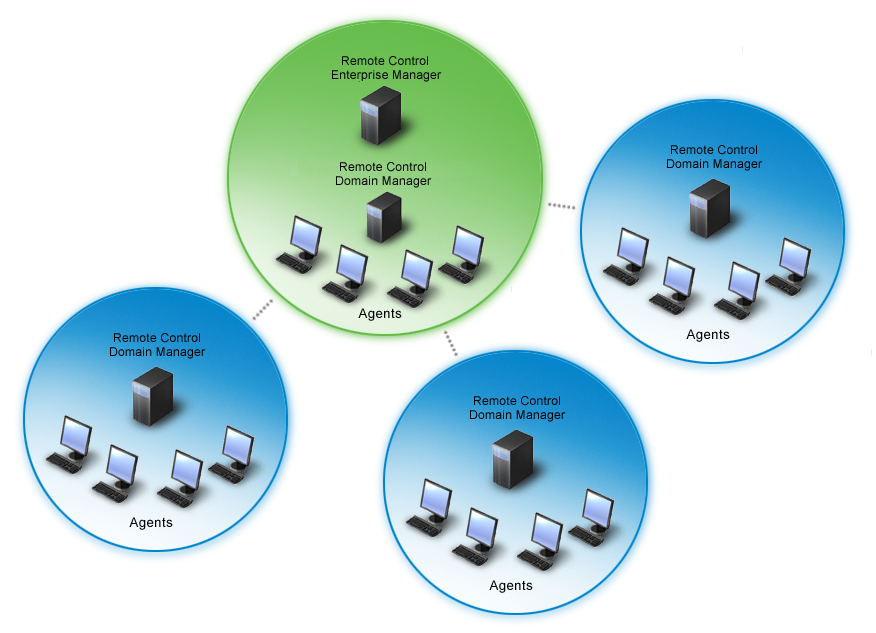
Global policies and remote control permissions can be defined and easily propagated to the entire organization from a single enterprise manager. This can be done on a geographic basis, for example, with the enterprise manager in North America and domain managers in North America, South America, Europe, and Asia.
The remote control manager provides the host with information that defines Remote Control security. The agent reports events and status information to the domain manager, and it can also receive commands. The enterprise manager, domain managers, and scalability servers are administered using the DSM Explorer.
|
Copyright © 2013 CA.
All rights reserved.
|
|